I rebuilt my blog (and then broke it)
You might notice that my blog now looks a bit different from how it used to! Let me tell you a bit about the old setup, why and how I got to a new one, and also offer up some basic benchmarks to compare the two with one another. Long story short, I wanted to eliminate as many dependencies as possible, so I'd have to update the thing less often - which led to me making my own static site generator.
Here's a quick comparison with the previous look:
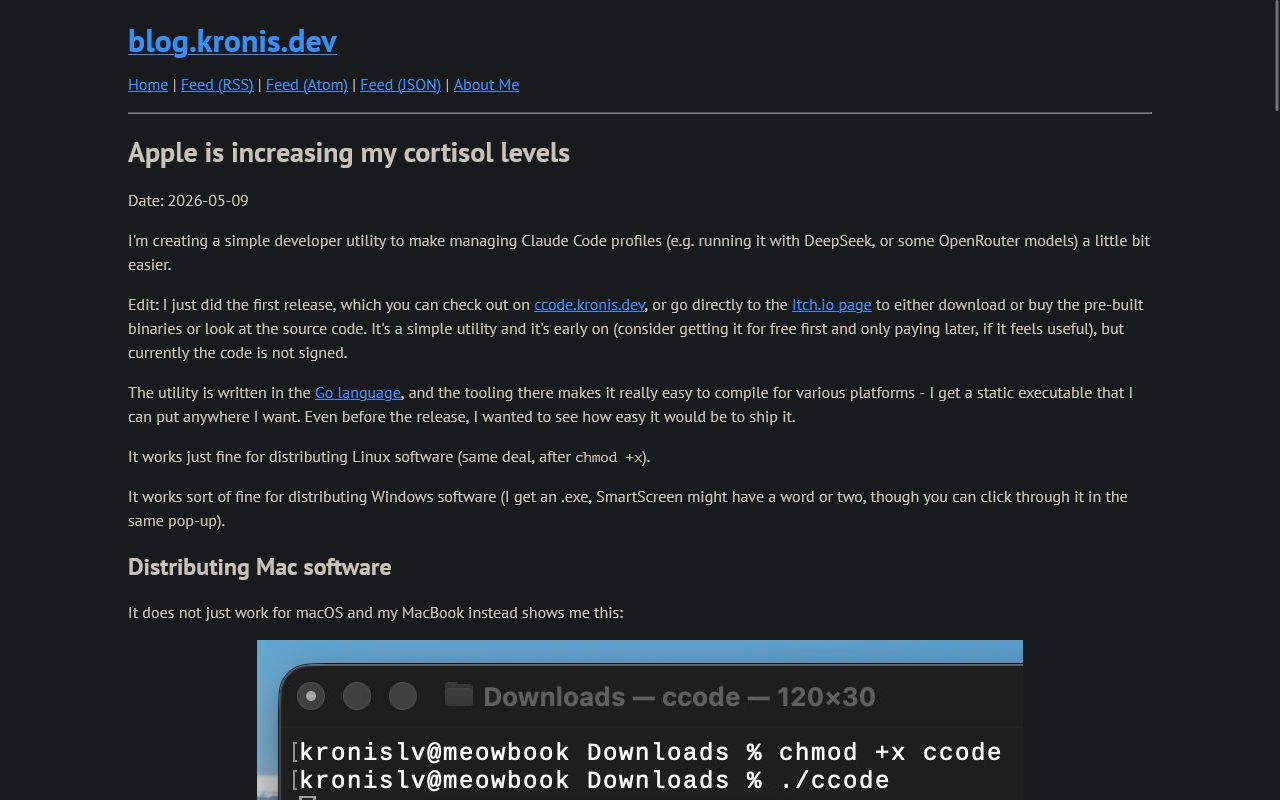
Or, at least, that's what it was like with the Dark Reader extension that I usually have enabled on my browser and have gotten used to, to the point where I don't even notice it. In contrast, here's what most of the other users would have seen by default. To avoid a flashbang inline, you can view the file here: 02-old-blog-regular-colors.jpg

It used to run on Grav, a flat file CMS that I still think is quite lovely! One of the reasons for me to initially choose it, was that I could write posts in Markdown (with some custom extensions, e.g. image resizing), and that I wouldn't need to host a full sized database - since WordPress setups, in comparison, are known to be a bit harder to get running well. I didn't care that much about having a huge ecosystem, nor having that many plugins.
Quite on the contrary, as are the reasons for me moving away from Grav - I want less, not more. With an ever increasing number of packages getting pwned, I realize one thing: when I wrote that slightly absurdist article called "Never update anything", I might have been a few years early to the party. My Grav setup got vandalized once and while it wasn't a very big deal, I have reason to think that the vulnerabilities out there will get more exploited as time goes on, not less. The good news is that my blog getting compromized wouldn't cause any serious monetary losses or whatever, the bad news is that as time goes on I have less and less time to actually keep software up to date. It stands to reason that software that has fewer dependencies and features will also have fewer vulnerabilities due to a smaller attack surface - that's also the reason why I'm considering moving away from Nextcloud for something simpler as well.
When it came to the blog itself, my choice was pretty clear - I'd just write my own static site generator (SSG) so I don't need a large PHP project, so that the attack surface would be smaller, and also because honestly I didn't need either the admin plugin or the analytics, or backups built into Grav, ever since I moved to a fully Git driven approach to publishing stuff: My blog doesn't need quality, it needs to look like it's from the 90s
Come to think of it maybe "quality" wasn't the best word choice, something like "modern look" could have been better there, but you get the idea - I went from using the admin UI, to pushing from Git and letting the CI do the builds, to now more or less knowing that I'm fine with a fully static site generator that also has a fast local development loop, and any other features that I might want (like having a back end component for search).
There are quite a few good SSGs out there, but since I want to decrease my dependency on external projects, I just slopped something together over the last week in Go, here's the new look with a native dark mode:
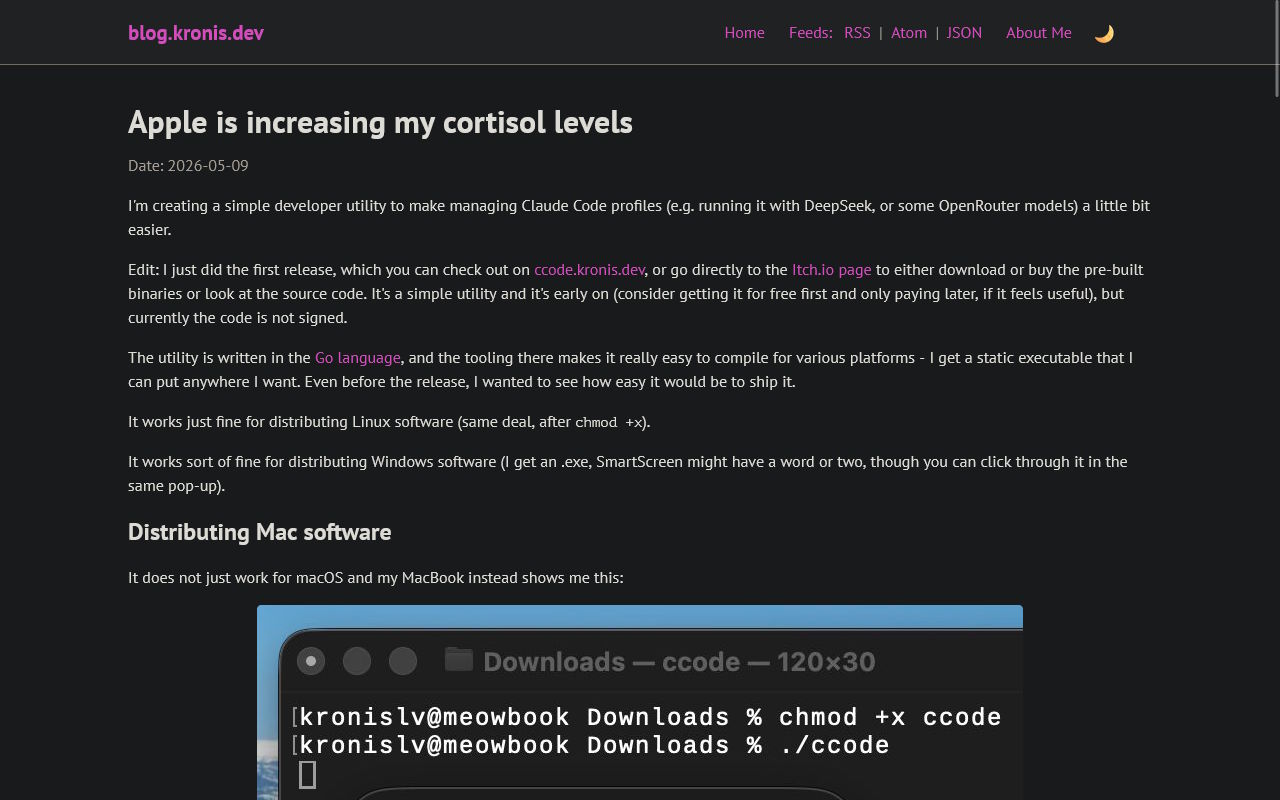
The default is actually whatever the user selects, so if you prefer a light mode look (e.g. if you spend sufficient time outside in sunlight that's probably better for your eyes), this is what you get instead, same as above, the bright version may be viewed separately: 04-new-blog-light-mode.jpg
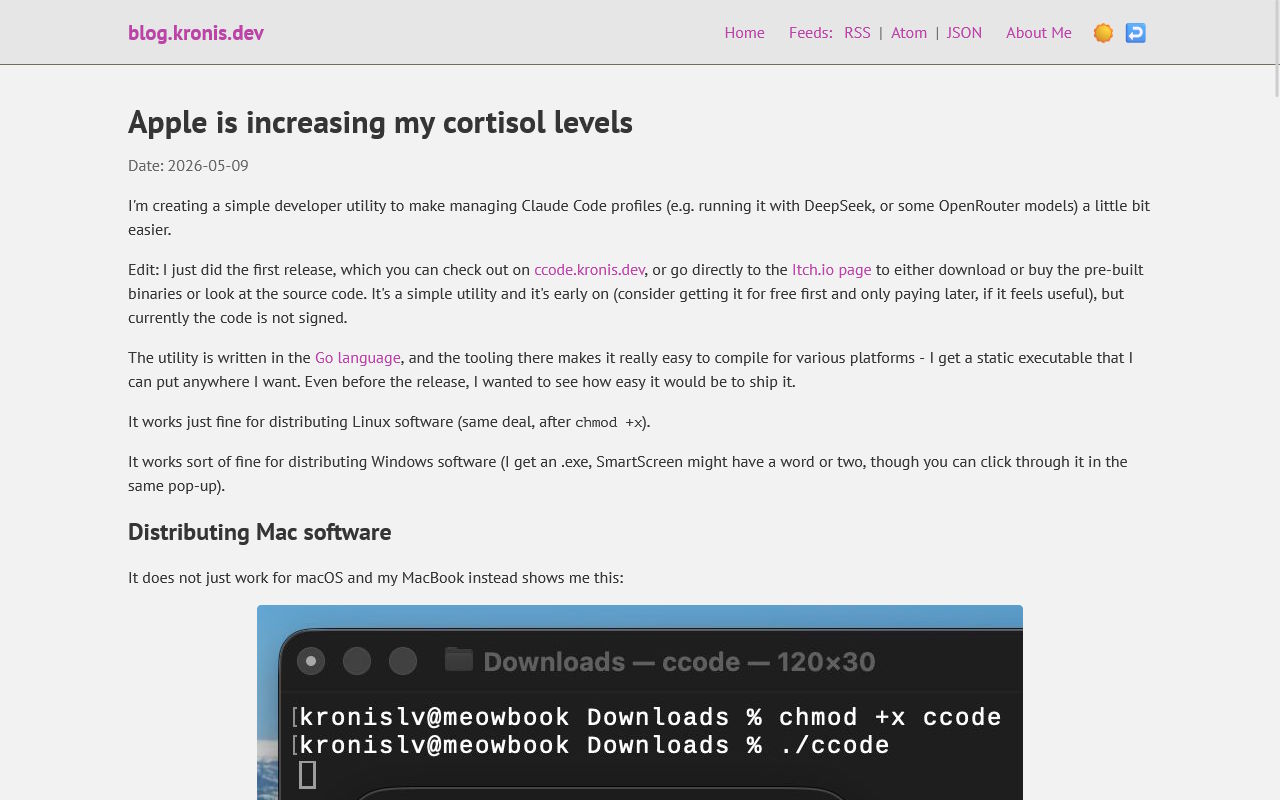
Still the same font stack, slightly different typography, still made to mostly work okay without JS enabled, in addition to supporting mobile decently:

While I did iterate a bunch and tweaked quite a few things along the way, I don't exactly imagine that heavily using AI to actually get something done while also being overworked in my day job will result in the perfect project, so I picked an apt name for this new project, Gravis ("Grāvis" being the fully Latvian version, which translates to "ditch"):
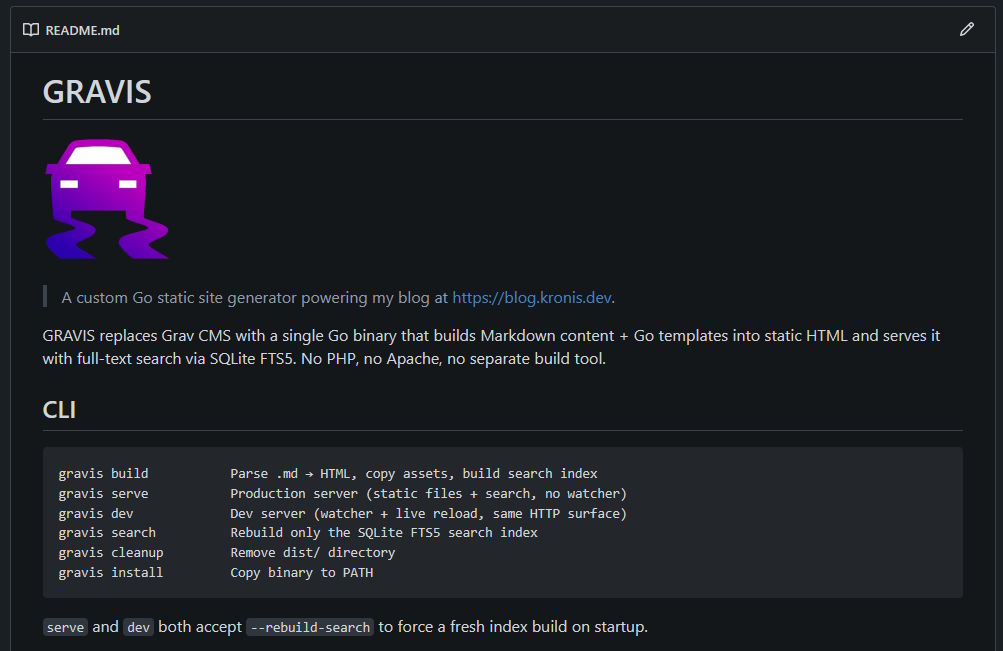
So, what is it? It's a Go app that uses net/http and as much stuff as I could get working out of the box, along with a few good dependencies like goldmark to produce and serve HTML files, with some bundled CSS and fonts. As much as possible is pushed to the build time and the live version lives in a container and pretty much has a read only workload.
For search, I do use a pre-populated SQLite database file, with their FTS5 extension for full text searching. It supports a dev mode where it watches the directory for changes and rebuilds files whenever they change, and in general is a bit kinder to the hardware resources than the PHP app (or at least how I had it set up) was.
There are also things that it doesn't do - since I use Apache2 as my reverse proxy (personal choice, it's good enough and their docs are great), the web server can handle ACME/Let's Encrypt stuff with mod_md, similarly, Apache2 can also handle setting headers for me, in addition to compression and whatever else makes more sense to do there instead of in Go code.
Load testing the new blog
I also decided that I probably wanted to load test how well (or badly) each of the instances perform various tasks - opening the homepage, opening the blog posts, using the page listings and also the search.
While Grav isn't horribly slow itself, I did set it up with mod_php as one of the simpler ways to get PHP working, which does get critiqued quite a bit in comparison to PHP-FPM, which is faster and which I also used to use, but decided against in the most recent iteration of rebuilding my own container base images (since there are so many: Node, Java, .NET, Go, PHP, Ruby, ... and I wanted things to be simple and low effort). The mod_php setup did work, just oddly enough seemed to be worse locally in particular, while trying to edit and preview new pages.
In regard to the actual testing, I made a few concessions: I'd need to test both with load testing tools such as K6, but also get at least basic metrics from real browser loads of the pages, for which I chose Playwright, which is great and which I can totally recommend you take a look at as well, especially if you ever need to do browser based testing (sure beats Selenium, in my experience, nice API). My own experiences with K6 are a bit more mixed - it's pretty nice for the things regarding HTTP, however the last time when I tried to integrate it with a WebSocket based auction application, it was just endless headaches and I couldn't get it fully working, though maybe things are better in the recent versions.
The goal was to be able to both launch everything locally in Docker containers, as well as test against the remote instances, and get a good look at how well things perform:
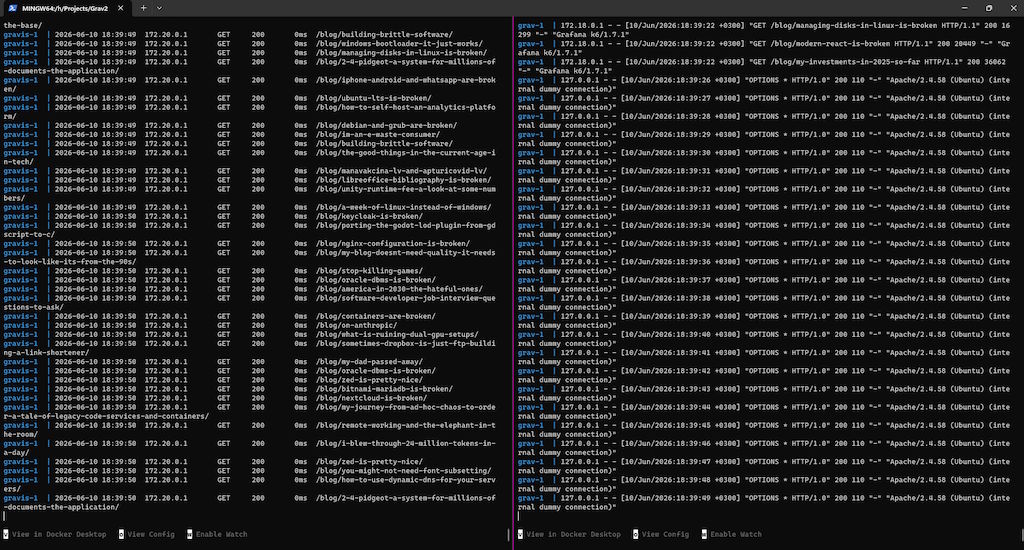
A somewhat important note, however, is that this isn't what most people would call a great or very scientific approach to testing - I'm not here to make any strong generalized claims about the overall performance of either solution, especially given my setup details. Plus, I'm not even trying to eliminate all external factors, just look at how I'm re-using the very same CPU for both running the software and also the benchmarks (though at least when I talked to the remote instances having a 1 Gbps Internet connection was helpful to at least eliminate that kind of a bottleneck). Heresy, I tell you:
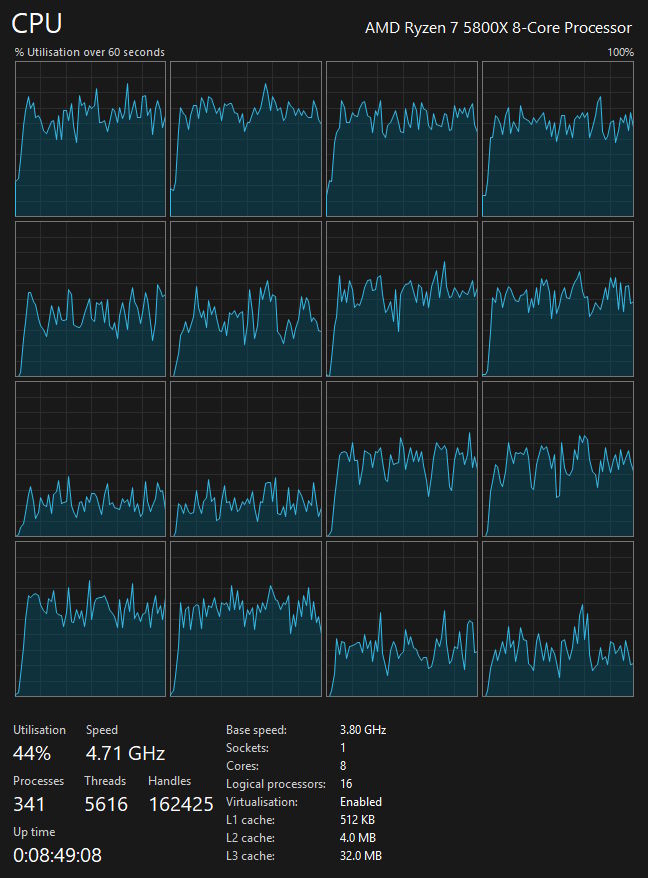
At the same time, the tests below are enough to give us a pretty good idea about how they perform in reality (in my specific circumstances). In a word, they let me show you why my quality of life improved a bunch after this migration, when it comes to blogging.
Oh, and if I'm talking about the methodology, the K6 part is pretty straightforward - I just create a bunch of virtual users (VUs) thanks to K6 that use whatever functionality I need them to, be it the search or browsing or anything else, the data about which is then aggregated and exported, which later on let me create a few graphs that you'll find below soon. Furthermore, the browser based tests load the full pages, with the content that gets served statically. While Apache2 is the common ingress that sits in front of either of the apps on the server, locally I talk to them directly (Grav also uses Apache2, its own instance with PHP, whereas Go serves the static assets itself), and it's nice to see how the overall metrics of either differ.
I didn't try to do load tests with the browser instances, because they're far slower and heavier than K6 workers, and because computationally serving those static assets isn't super intensive and is more like pushing a bunch of data through a tube. Consequently, that's also why going from the Twig templates on PHP to pre-rendered PHP pages (even if they have their own cache as well) to Go does make at least serving blog posts way simpler, even though the search is still dynamic.
Either way, I could at least compare all of the instances as I wanted, though the real blog had to be re-run before the migration when it was still on PHP and after the migration to test the Go implementation:
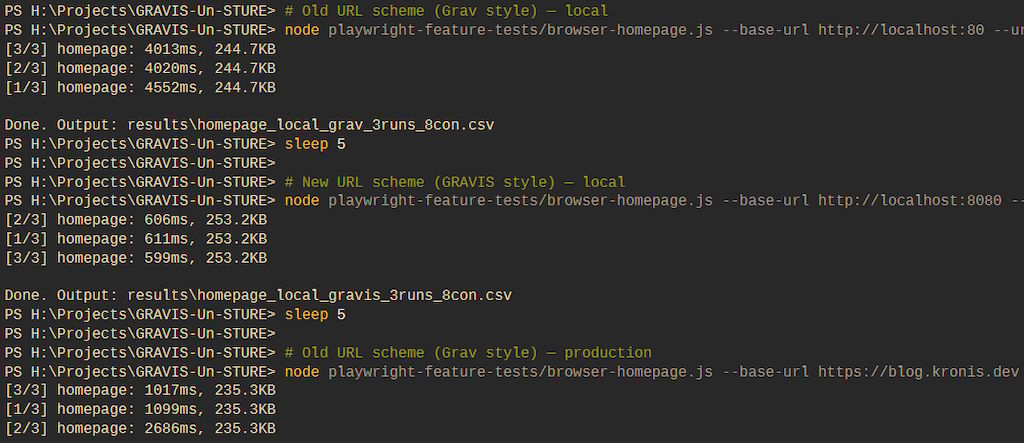
Here's also a quick example of the browser based test that went through all of the posts, one by one:
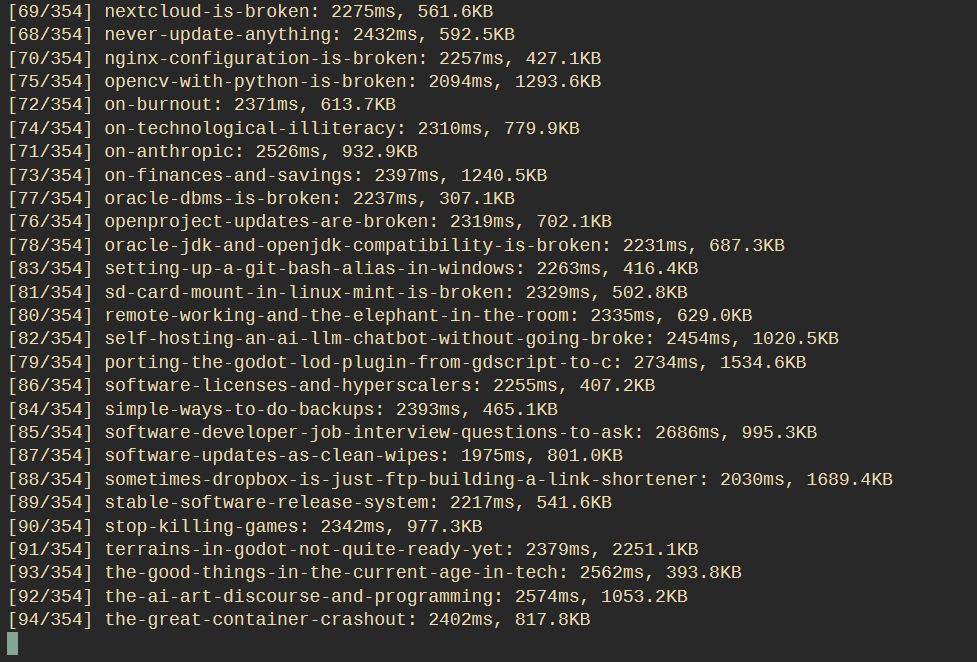
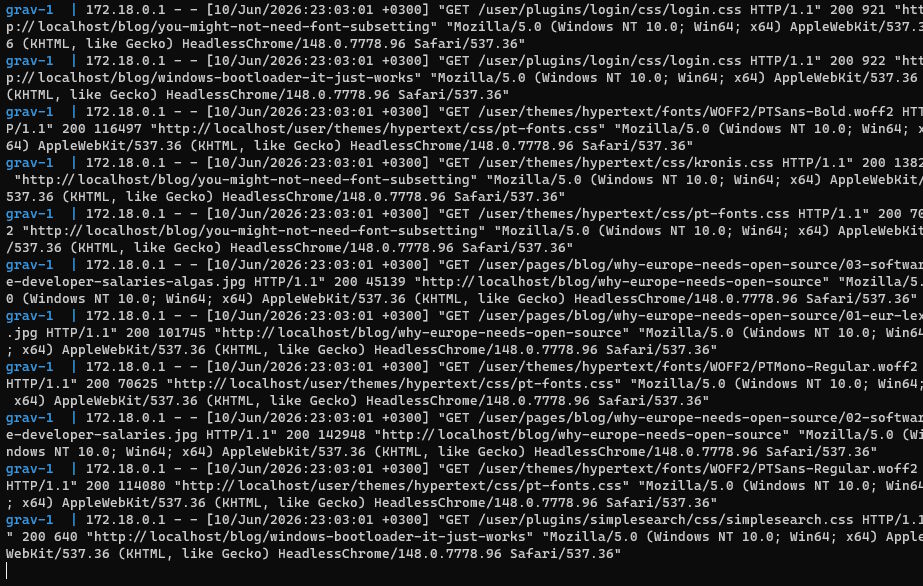
And here's an excerpt from the logs, showing that those particular tests also fetched all of the static assets (I could automate that with K6 as well, but it'd be a bit more annoying to extract all of the static image links and such, and to estimate how a real browser fetches those):
So, what are the numbers?
So, let's get into it. I simulated up to 256 virtual users, which was enough for me to get a pretty accurate look into how the instances perform.
First up, here are the containers at idle (ignore the ones that aren't relevant here), as you can see, the Grav (grav2) based setup and Apache2 (apache2_ingress) don't consume that many resources at idle and everything seems pretty calm:

However, once I applied enough load, it became apparent that Grav was the bottleneck here (thanks to mod_php):

People used to say that you typically shouldn't worry that much about slight differences in the performance of your web server, however in this case I proved them both wrong and right - wrong, because it's not the reverse proxy (that handles TLS, compression and routes traffic between all of the containers I want) but the application server that's slow here, which ALSO happens to be the same web server, just configured with a slow runtime.
Htop also demonstrates this in a visually pleasant way:

You will notice that the usage doesn't go much past 50%, which is because I place limits on the containers themselves:
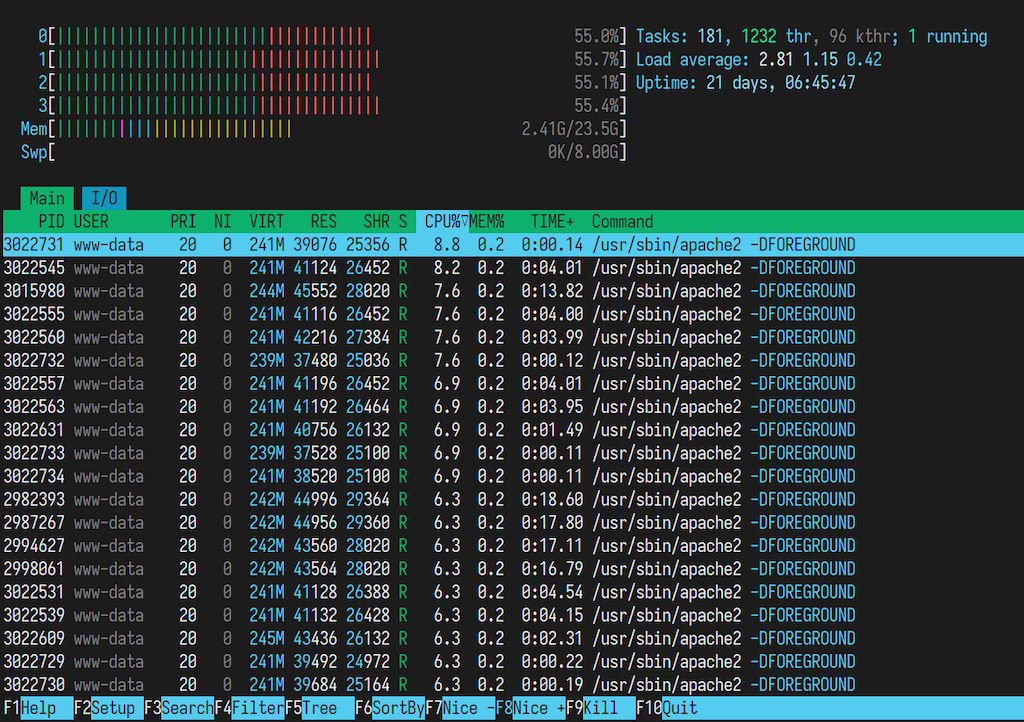
Personally, I'd much rather have containers buckling under load (there are automated restarts if they break entirely in place), rather than the whole server becoming unresponsive, especially since it also runs a bunch of other stuff and containers. I guess my current issue is that I don't have an easy way of telling Docker "Hey, never use more than 95% of the server's CPU" or maybe reserving some resources for the SSH server.
While I could probably (hopefully?) figure out how to setup that with cgroups, cpus: '2.0' is delightfully simple (and generally good enough, though I'd like better support for bursty workloads when the other containers aren't doing anything). Either way, none of this is as bad as kswapd deciding to eat 100% of my CPU instead of just doing OOM kills of containers when there's memory over-commit and the swap gets exhausted on Oracle Linux that I couldn't really find a way around, when I had to use that.
Whatever the case, Gravis immediately performed better and used less CPU. We more or less saw the opposite compared to the previous situation here: it could process more traffic than Apache2. At lower loads (anything realistic) this wasn't an issue because both sat under the total limits, here's an example of 64 VUs:

Here's an example of 128VUs:

And here's an example of 256VUs:

Thankfully, this blog doesn't have so many readers to make me deal with that many requests hammering the server all the time, but it's interesting to see that with the static site generation suddenly we see the Go implementation be roughly twice as capable as the Apache2 instance sitting in front of it. I suspect that difference would narrow if Go had to also do compression and TLS termination, while Apache2 would only get marginally slower if it was serving the files itself (which in my setup it cannot do, because it only routes traffic, as ingress should). No matter how you look at it, it's nice to see that neither of the solutions is an order of magnitude slower than the other, meaning that even without a bunch of tuning, the overall setup is decent.
Here's some examples of how the server handled the increasing load with Gravis, 64 VUs first:

Then 128 VUs:

And finally, 256 VUs:

The local testing was quite similar, except instead of hitting the live docker containers running on an Ubuntu server with Docker, I was instead talking to local Docker containers running on Windows (through their WSL based engine). Since there's already a few images of logs in this here post, let's jump onwards to some graphs I made.
How about some pretty graphs?
All of the testing above also aggregated the data locally in JSON files for me to then process. I figured that with what I had I could provide two groups of results (the load testing and then the browser testing), as well as a few metrics in each. Let's proceed!
K6 testing - Throughput
Here's the most basic of metrics we might care for, essentially, how many requests we can successfully process per second. Here, I found some odd things and had to retest a few times, just to confirm my findings, which seemed to hold.
It was immediately obvious that the Go implementation was way faster (as you'd expect not only from Go in comparison to PHP through mod_php, but also from the static vs dynamic rendering), however, there was a point at which the throughput on the server instance seemed to collapse:
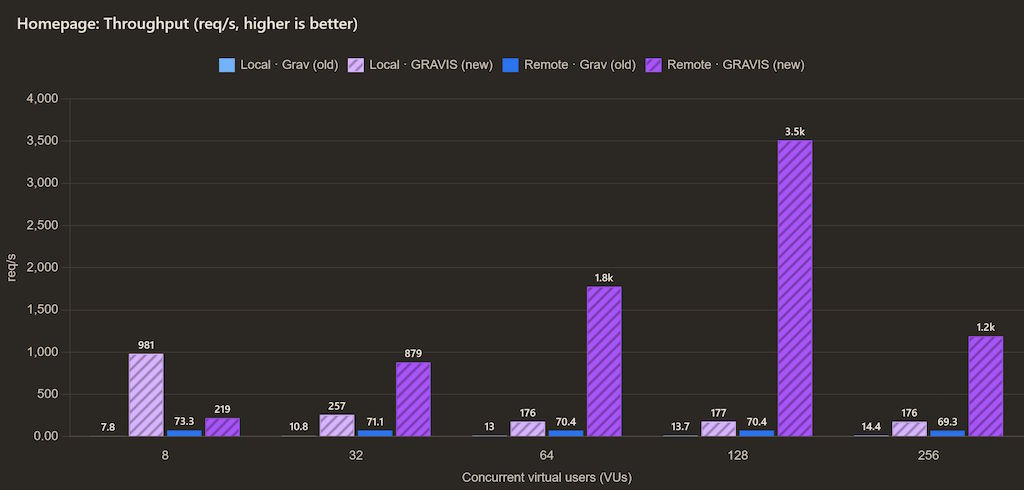
Don't get me wrong, 1.2k requests is still a lot, and certainly more than the 69 requests/second that the Grav version used to get me, but that seems to suggest that something along the way was starting to go wrong. Apache2 might have been unable to keep up with the load due to its limited parallelism configuration, because it was still sitting in front of the Go application, but it being able to process 3.5k requests/second with 128 VUs and then almost 3 times less at 256 VUs was puzzling.
I might have to dig into the logs to understand this better at some point, but thankfully the load isn't very realistic for now, since while hitting the HN front page did make Grav struggle a lot, it's not like the whole site would go down immediately because of it. Oh, and you can also see that the local performance of Grav was quite trash, which held consistent across all the benchmarks - seems like Docker containers on Windows are a really problematic environment for Apache2 running PHP for whatever reason.
The blog posts seemed to scale a bit more linearly and closer to how you'd expect. At lower loads there's not a world of difference here, but at 256 VUs, Gravis absolutely crushes Grav with 1.6k requests/second vs just 70 requests/second:
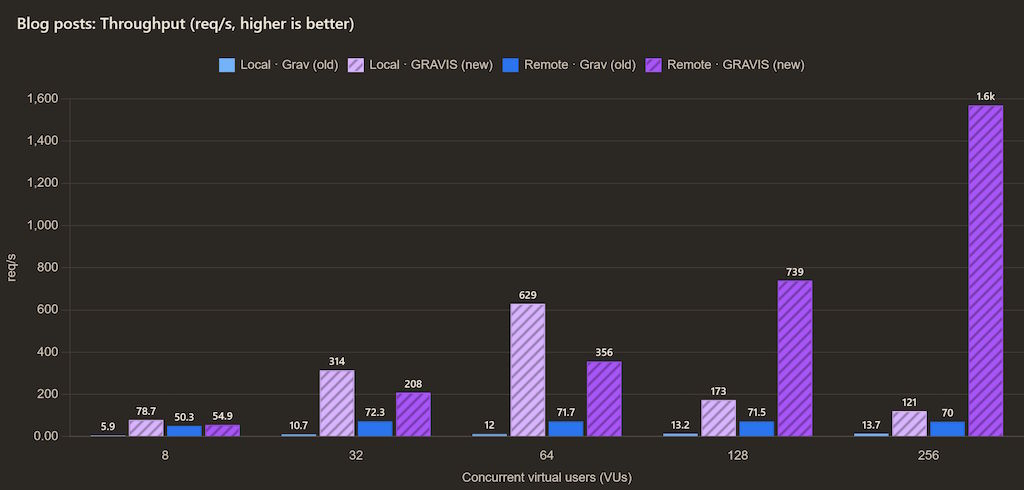
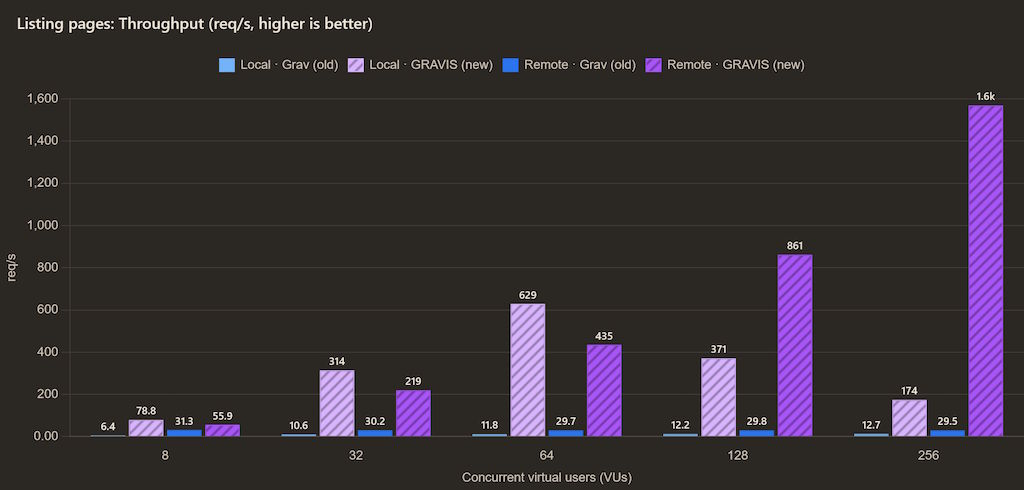
More or less the same could be observed with listing the blog pages, where Grav was even slower, the local Gravis instance had a similar collapse of performance, which suggests that it's not Apache2 but something else, because locally there was no Apache2 in front of it, only on the server, whereas the Gravis docker containers on the server had no issues to speak of:
Search throughput was where it arguably got way worse, though Gravis was still plenty fast in comparison to my Grav setup, so that's still a win:
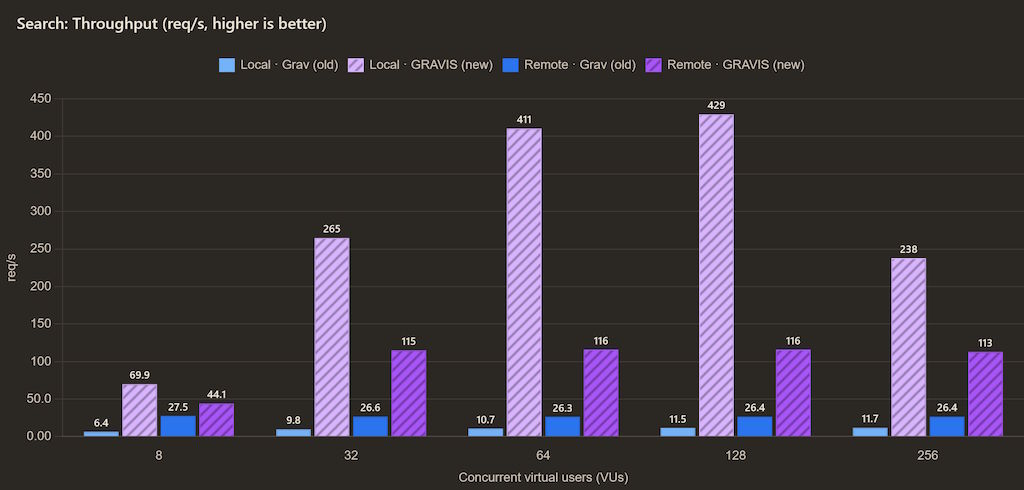
It did make me wonder about what might cause the performance degradation, though. On the server, I have HDDs running with a RAID array, whereas locally I have a SATA SSD (NVMe for the OS, but the projects are on a SATA SSD, though sadly it's one of those QLC ones, so the write performance sucks for other workloads), which makes me think that I might be I/O bound in a way that only seems to surface under a greater load.
This wouldn't be impossibly hard to test, I'd just need to load all of the data in memory upon startup - it's a blog so even with all of the images and whatnot it's less than 1 GB and the pages themselves probably fit on a few floppies, so it'd be perfect for being tested that way. On the other hand, the SQLite database isn't really written to and since it's just a regular file, surely it'd end up on RAM as a part of disk caching anyways, right?
Not world's biggest mystery to solve, and I probably don't have the free time for it right now (am writing this at around 10-11 PM), but would be nice to look into at some point! It's either that, or some weirdness about either OS sockets or maybe how Go is serving stuff, or the reverse proxy in the case of the server. There, it seems to cap out and work at around 115 requests/second, whereas locally we still see that collapse.
I probably should have pulled in I/O stats from the environments themselves, in addition to performance metrics on the app side. It might also be a case of different bottlenecks across the environments and configurations.
K6 testing - p95 response time
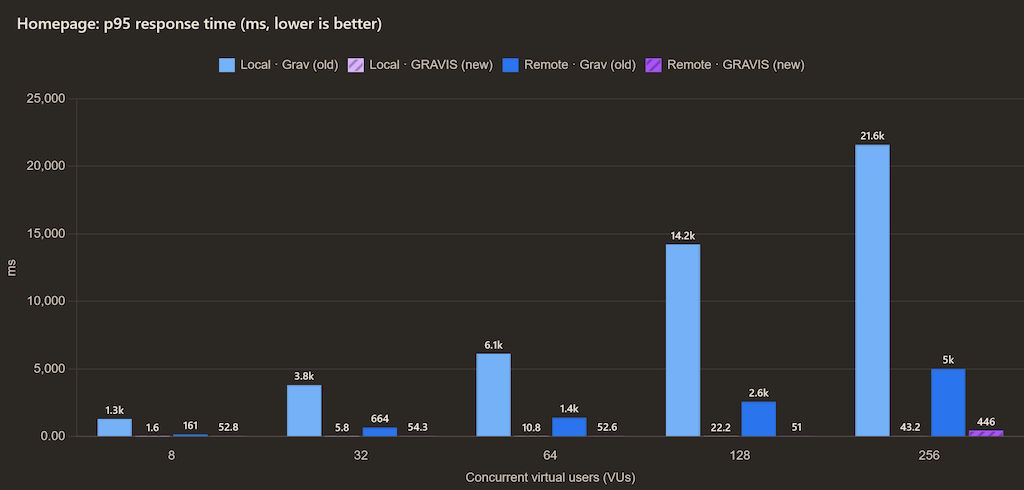
In regards to the p95 response time, we see something else that's interesting - it's not horrible on Grav when it's running on the server, but it absolutely is locally, which just further illustrates how writing blog posts was just ever so slightly annoying locally:
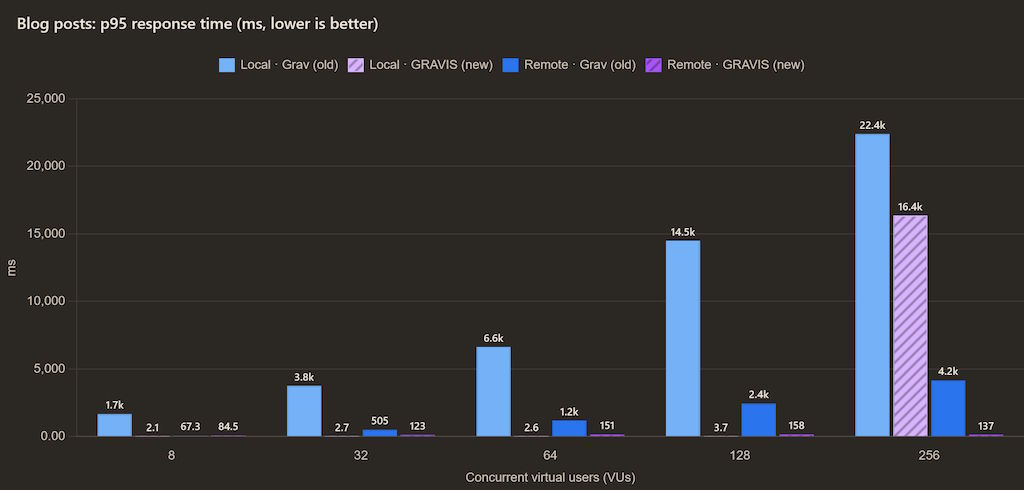
The blog posts p95 still shows that Grav is struggling, whereas Gravis locally also seems to similarly collapse, but works just fine on the server:
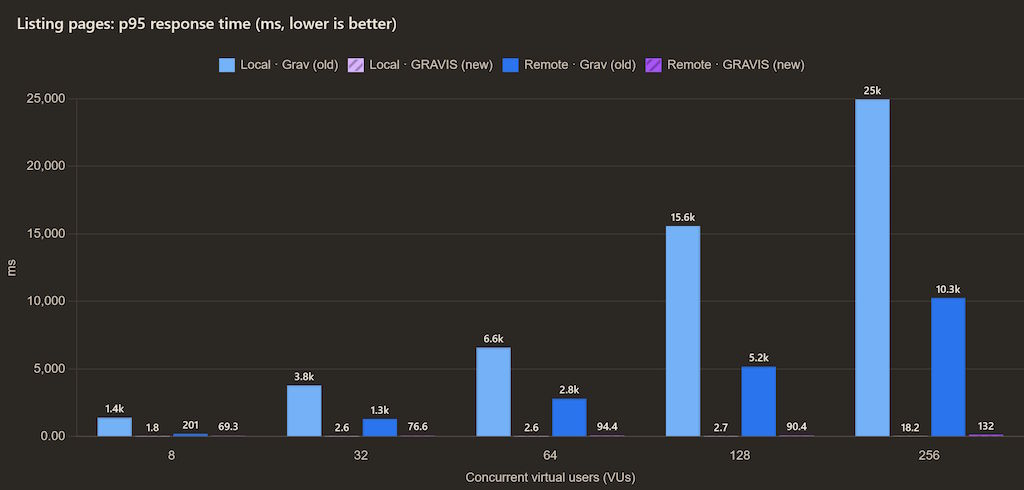
Listing pages seem to have no issues with Gravis:
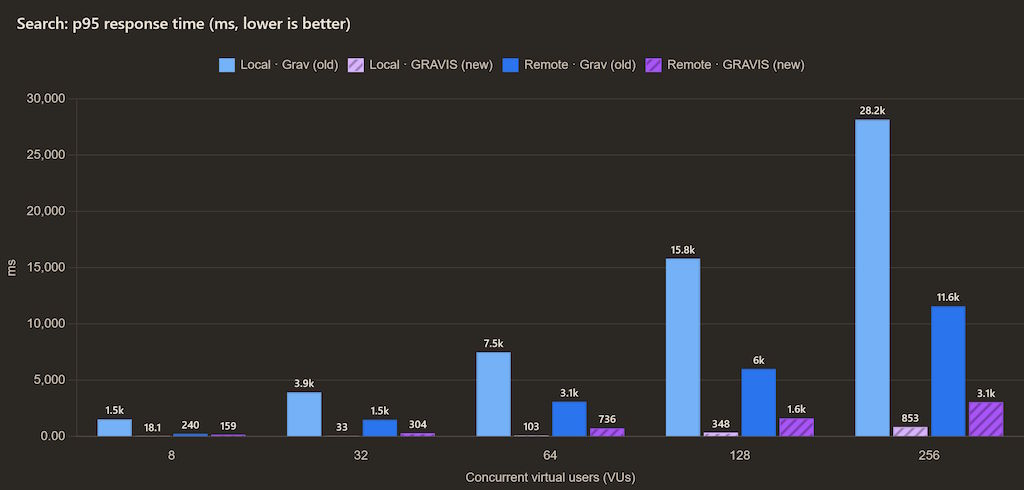
And the search also does pretty well:
K6 testing - error rate
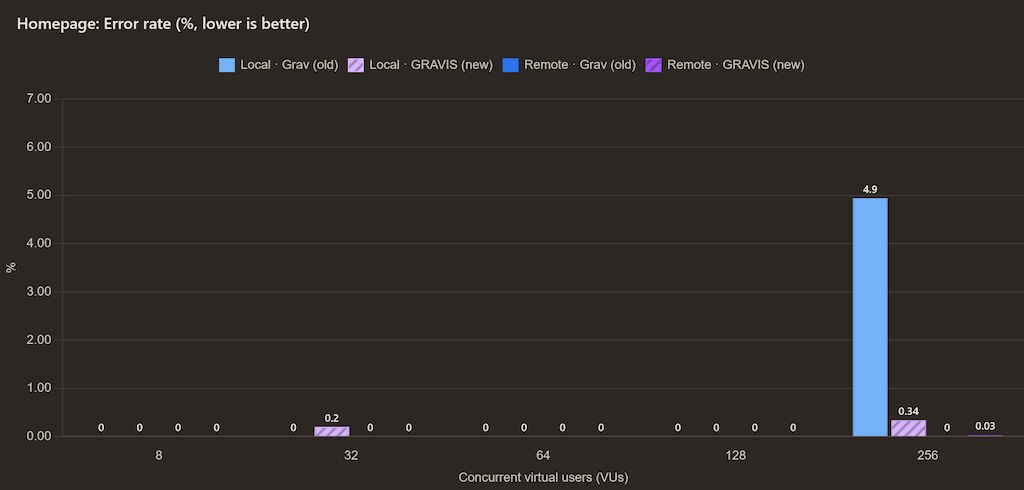
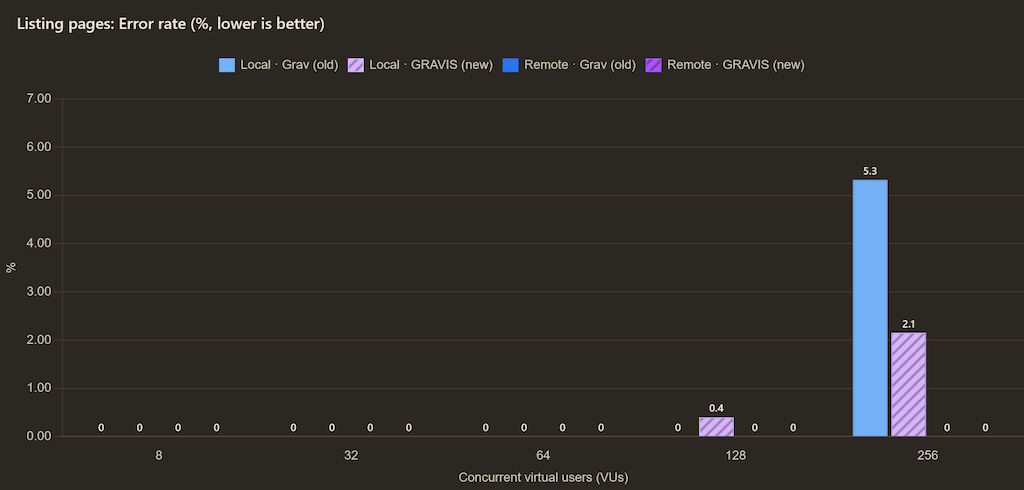
Next up, the error rates in percent of all requests. I might have needed to instead show the failed request counts, but luckily the percentage values are largely good enough, because the overall picture is very clear here. We had almost no errors at lower concurrency, and they really only showed up at 256 VUs:
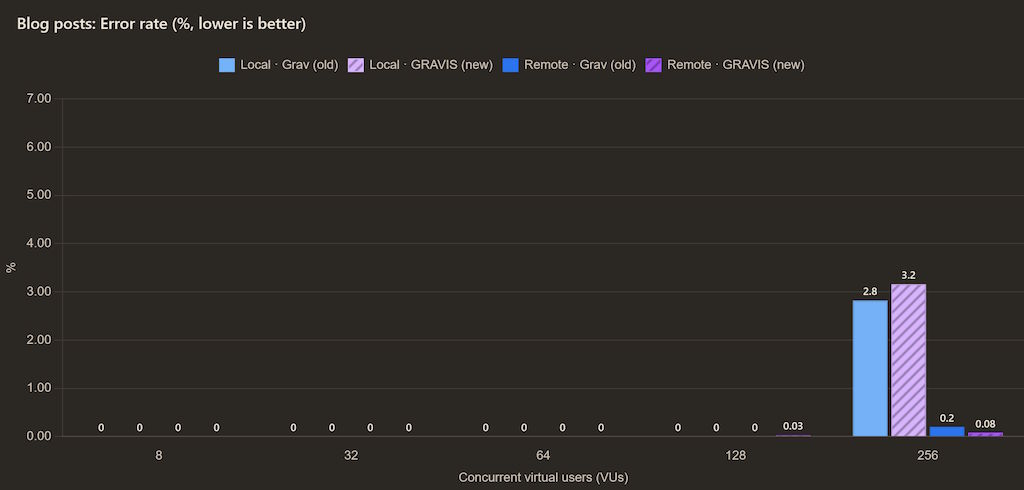
As it was in the homepage test, it's also more or less the same in the blog posts:
And also in the page listings:
And finally also in the search:
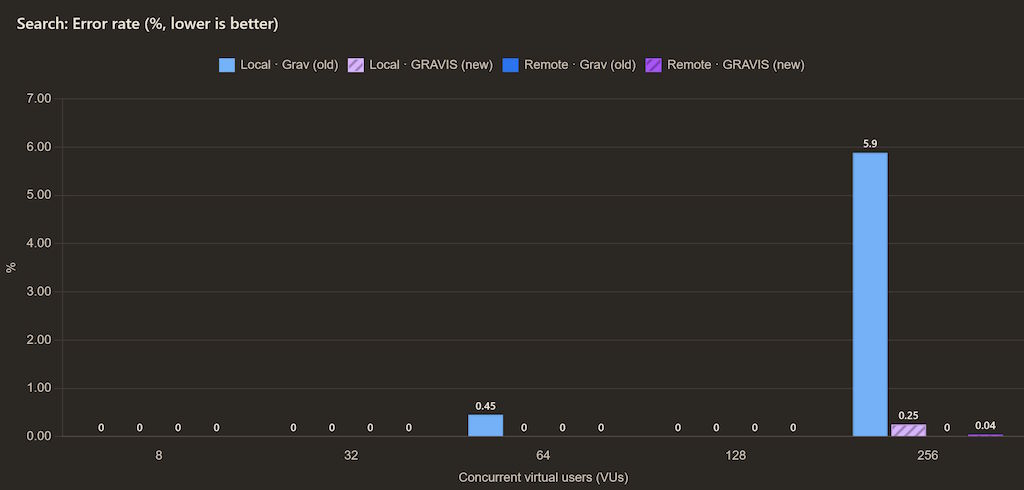
On the server, things were mostly fine with both Grav and Gravis just slowing down, whereas locally with enough parallelism the requests would start failing. Thankfully, even if that were to be the same failure mode on the server, 256 VUs slamming the server corresponds to a much, much higher real user count - because typically a user would just load a page and read it, a few more images would lazily load in as they scroll down, meaning that this can easily support anywhere between 2k-10k real users looking at it before things get bad, traffic that this blog usually doesn't even generate.
As I said, the testing isn't very scientific and while there's not enough data for me to draw exact conclusions from, at least it gives me an overall idea - the new setup won't be worse than Grav, with the added benefit of me needing to worry a bit less about the dependencies and updates. I can also only write and include the features that I need, as well as re-test things later and optimize the codebase more, if I figure out exactly what the current obstacles are.
Simultaneously, if it's proven at any point that the bottleneck now is truly just Apache2, at that point I can evaluate whether I even need to push further and switch to a different web server like Caddy, or whether at that point it'd just be optimization for the sake of optimization, instead of for real loads that my blog is likely to see.
Browser testing - other metrics
In addition to the above, I also did the aforementioned browser based testing, where I checked some additional metrics, to see how the apps perform with real browsers. First up, there was the page weight - since I was looking at the same pages, with the same images and same fonts, you can see that the averages are also very similar:
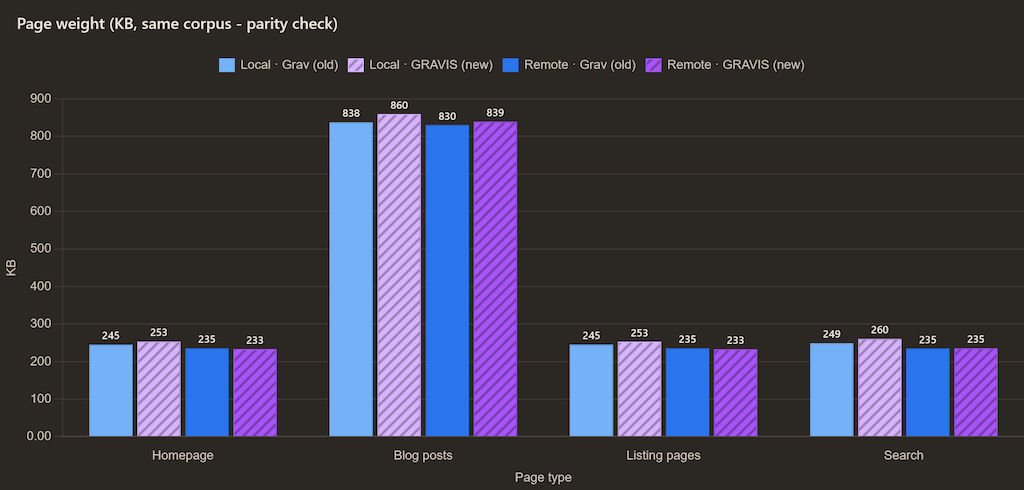
The differences are mostly due to me having a bit less CSS and JS in Gravis, whereas the local and remote pages differ ever so slightly due to some templating changes in the configuration. In general, however, you can see that a full page load is around 250 KB (in no small part thanks to my choice to self-host the fonts as well), whereas the blog posts add space on top of that with images:
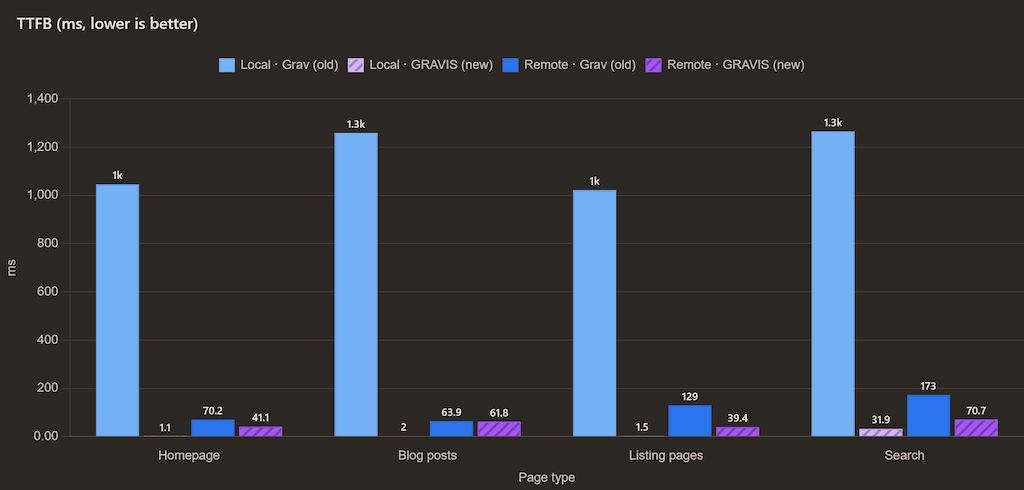
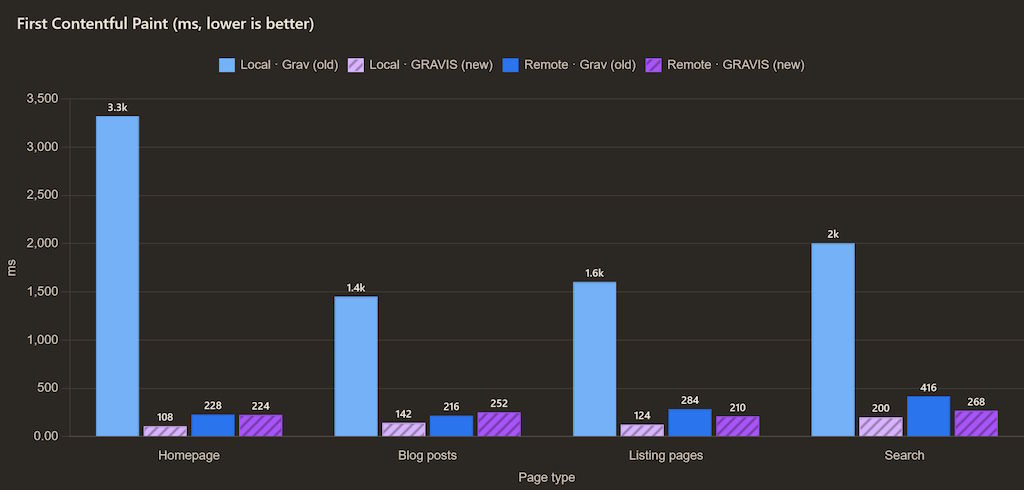
The first contentful paint in a real browser demonstrates some of the more annoying aspects that I had to deal with in regards to testing the Grav setup locally, where for whatever reason the render blocking resources take a while to load, at least compared to all the other setups:
And finally, we see something similar in regards to the full page load, working locally just wasn't pleasant:
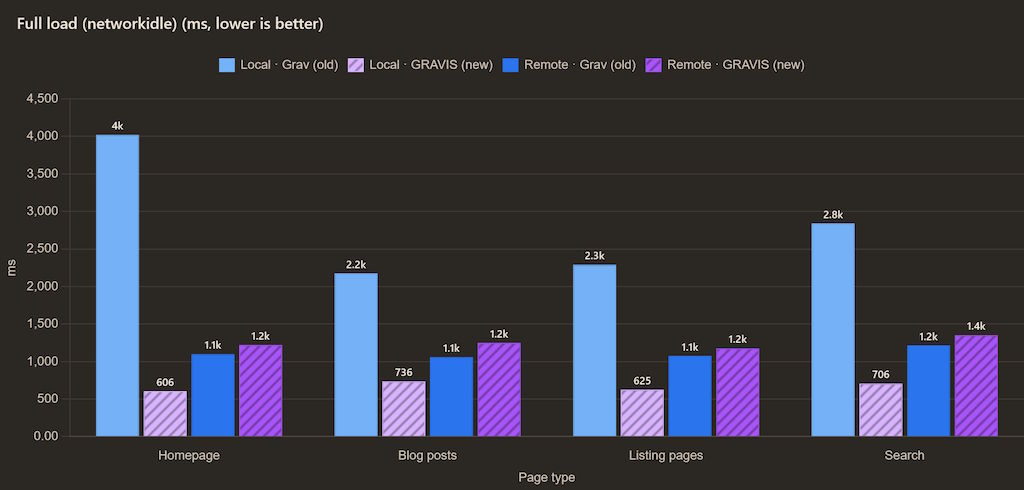
Despite the throughput being better, the Gravis setup still takes more overall time to load on the actual server, than in the PHP based Grav setup, though it wasn't a big difference.
Summary
In summary, I am both pleased that I managed to get this done, as well as a bit puzzled by the initial results.
Grav is pretty nice, but writing my own SSG was a pretty nice choice - now there are fewer dependencies for me to manage, the overall setup is simpler, it does everything I need it to (and nothing I don't), it fits well within my stack and local development is quite the joy. For example, when I add a new sentence or paragraph to this file in Zed and hit save, I see this and the new page is available for preview before I can manage to refresh it in the browser:
Updating...
  I rebuilt my blog (and then broke it)
  Updating listings, feeds, search, sitemap, robots.txt...
Done.
I could maybe even explore a setup similar to what I have for a presentation tool I wrote, where there's a script within the page that talks to the dev server and automatically refreshes the page, so I don't need to.
At the same time, the testing showed that under realistic loads Gravis will be a pretty good replacement for Grav and won't have issues serving similar loads, but that under heavier loads the performance and throughput can collapse. It's generally still better than the old baseline, but the failure modes seem to be a bit different across the different environment. What's worse, it seems to happen even when the task is to just serve up index.html to a lot of concurrent users - a pre-rendered file that should fit within any sort of a file cache that the OS has.
While I no longer have the old Grav setup to compare against since I've replaced it with Gravis now, I'll probably need to do some additional testing another day when I have the time and maybe trace down exactly why the results look a bit funky. Until then, a lot of the above is guesswork, on one hand pulling in more metrics from the actual environments would have helped a bunch - but on the other, that'd extend this well into the Sunday, not just Saturday, I still have plenty of stuff to do tomorrow, unrelated to this.
The ideal circumstance would be finding out that it was just due to me running MOST of my tests on my main PC being the culprit, for better testing I'll need to reinstall my homelab Ubuntu servers to distribute the load more (OR temporarily just get some beefy VPSes because I'll only need them for an hour).
I also fed in the raw data into Claude and there are some promising findings there already, it might indeed be Apache2 (I've done similar configuration changes for work, it can be tuned quite a bit even if the defaults are conservative), alongside the local setup being a bit borked cause of how Docker works on Windows too:
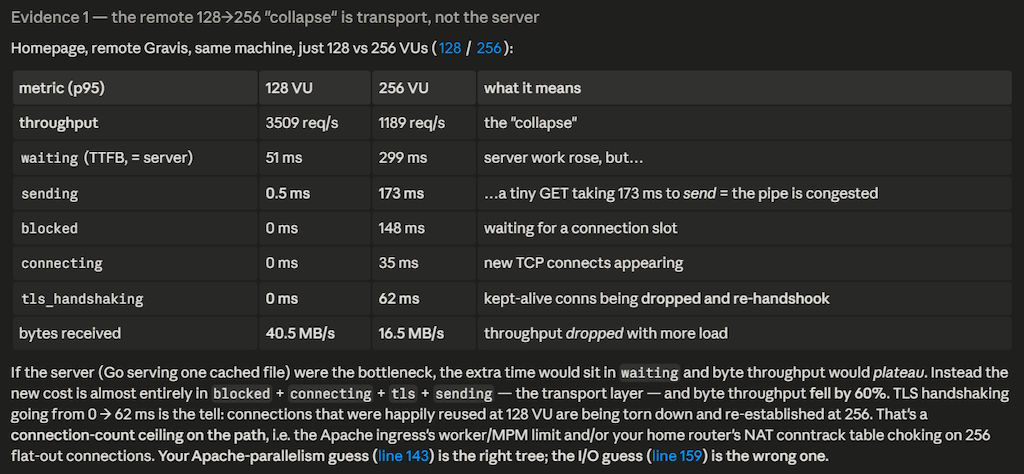
A more rigid test harness is probably the right way to go about it and would be fun to do sometime, though I'm not reconfiguring Apache2 to test that just now. The current setup should be good enough, especially for my next post where I'll probably complain about the way how LLMs do writing.