Intel Arc B580 encoding issues with OBS (and what to do)
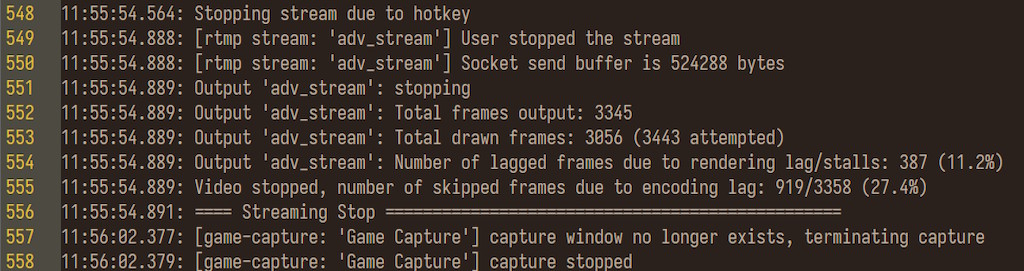
It seems that the media chips in Intel Arc B580 (and similar) GPUs don't handle streaming and recording that well, while the GPU is overloaded - instead of making the game FPS drop and keeping the stream and recording stable and smooth, they focus on giving all of the processing power to the game. The end result is both the video and stream getting increasingly noticeable amounts of dropped frames, to the point where the footage is quite unwatchable:
Because it's easier to just show this to demonstrate, I made a YouTube video: Intel Arc B580 encoding issues with OBS (and what to do)
As you can see, when I play an Unreal Engine game, the in-game framerates sit close to 60 FPS which is mostly okay, however depending on what else I am doing, the local recording alongside the stream ends up being very stuttery. As it turns out, even the OBS preview window can have a pretty noticeable effect on this, once you're in the high 90 percentages GPU utilization wise.
I have previously even attempted to run various dual GPU setups to get around this to some degree, but they came with plenty of other issues:
- Two Intel Arc GPUs in one PC: worse than expected
- What is ruining dual GPU setups
- More PC shenanigans: my setup until 2030
To a relatively large degree, it seems like the answer to getting a good GPU for both streaming and recording and gaming at the same time would be: "Give your money to AMD/Nvidia." because they have a bit of an advantage in how long they've been working on their own encoders (NVENC is especially nice). However, I'm quite broke, and so I decided to at least look into whether there are any alternative approaches that would at least let me stretch my B580 into being usable until 2030, given how messed up the PC part market is right now.
What didn't help
I figured that I might try to patch the OBS source code, because it has some odd things here and there, like not setting the process priority when you have an Intel GPU (presumably something from the days when they only had iGPUs and giving too much of the power to OBS might have made the rest of the system laggy and unresponsive):
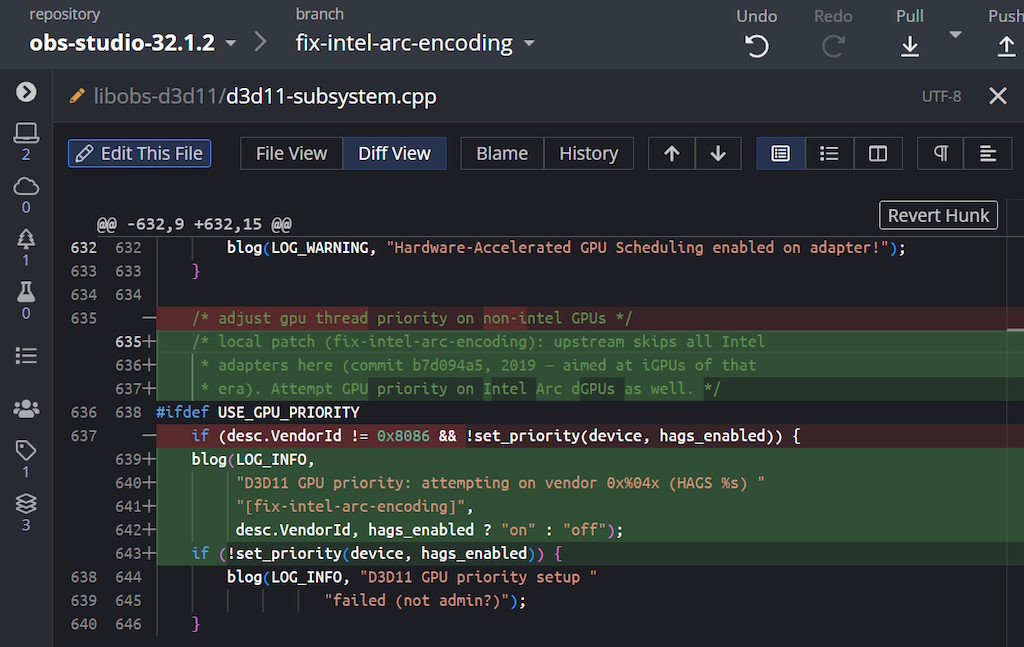
Sadly, that didn't really make that much of a meaningful difference.
I also evaluated some other options, neither of which fixed it either:
- trying to use different codecs - to me, it seems like AV1 and H265 are both quite resource intensive, worse than H264 in that regard; so if I want to use QSV, I have to largely stick with their variety of H264
- trying to alter the OBS settings - neither the latency or B frame settings really helped much, I'm already only targeting 720p streams and 1080p video recordings both at 60 FPS and locally VBR with 24-30 Mbps
- trying to use the stream encoder - this also didn't help, because Twitch is limited to about 6 Mbps, so I'd get the insanely low quality VOD equivalent as my local recording, unusable
It appeared that the issues were largely coming from doing both streaming and recording together at the same time, which I sadly must do, short of getting a capture card (or looking at DistroAV, which has its own problems) and using my MacBook as the stream PC. If I could just record without streaming it'd actually be mostly fine, which is why I imagine such a dire issue went past Intel's QA; I don't imagine many of their engineers sat in the Twitch bandwidth test mode and simultaneously tried recording locally.
Instead, here are a few things that eventually DID help!
What helped - OBS QSV oneVPL plugin (sort of)
On GitHub there is a now abandoned plugin for OBS, which exposes some more of the libVPL controls to you:
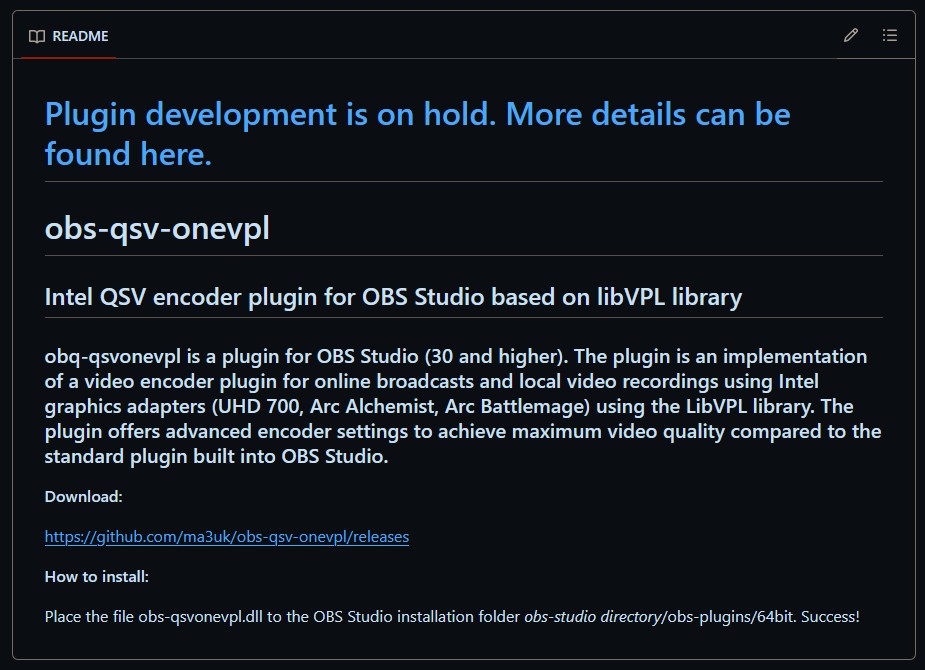
It's unfortunate that it's no longer under active development, however it still compiles and does work in the recent versions of OBS. Based on my testing, there are cases where it can run a bit more smoothly under higher loads than the OBS built in QSV plugin, though it wasn't a groundbreaking difference. Oddly enough, there were situations where if I stream with the built in QSV plugin and do a recording with the oneVPL plugin, then the overall results were better than doing two similar jobs just both with the QSV plugin.
I'm not saying that this will fix everything for you, but it's at least worth a shot, especially because they technically let you choose which GPU you'd like to try to do the encode on - if at some point I go back to a dual GPU setup and have both my A580 and B580 in the same PC again.
What helped - closing all media, including OBS preview (really)
As the video shows, any background media (even decode) task has an impact on the output - most people just leave the OBS preview window on, at least if they have multiple monitors, and that sinks the overall performance much more than you'd think. Then again, once we're past like 90% utilization, it shouldn't be that surprising. If you right click it in the OBS window, you can disable it:
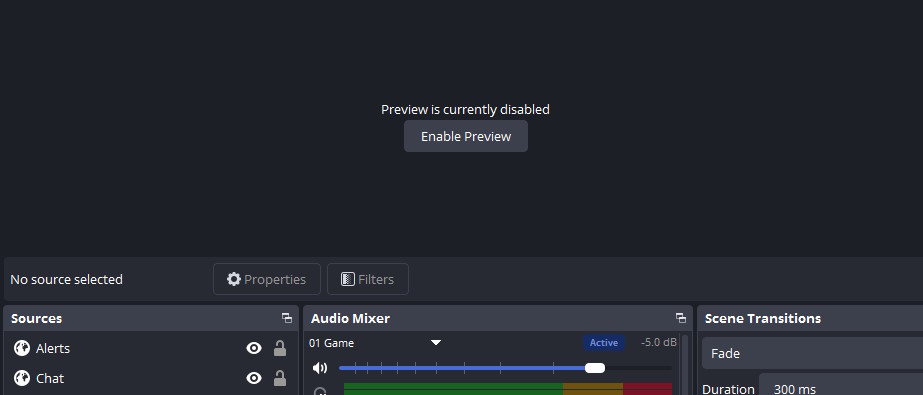
The same goes for any sort of a video decode task. If your GPU is struggling to do the encoding, you can also try to pause any YouTube video playback (and/or tab away or close the tab altogether), which made the difference between something completely unwatchable and something only mostly unwatchable.
What helped - limiting framerates dynamically
Even after closing the preview and media and using H264, if the GPU hit high utilization, the output would still struggle, there would be dropped frames and a bit of what I can only describe as jitter - where it felt like the frames were arriving out of order, or like the playback didn't have a consistent speed (the video shows a few examples of this, especially the low latency configuration).
What has worked for me in the past is RivaTuner Statistics Server (RTSS), where you can set FPS limits:
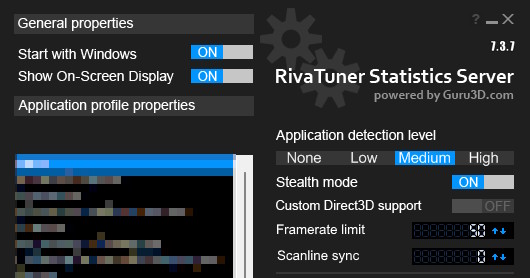
I also use it quite casually and set 60 FPS or sometimes 120 FPS (in e-sports titles, for lower input latency) as the target, because then I don't have to worry about my GPU overworking itself to render as much as possible all while I only have a 60 Hz monitor for now.
At the same time, this doesn't really solve the issue wholly either - what if you can stream for 6 hours and the GPU has the spare capacity to do 60 FPS and only needs to drop to let's say 50 FPS for 2 additional hours in a more intense area? Either you degrade the overall experience by having 50 FPS throughout instead of 60, or you have 6 hours of good footage and 2 hours of a stuttery mess because the GPU couldn't keep up.
The solution there is to limit the framerates dynamically. Thankfully there's a program that hooks into RTSS and allows you to change your FPS limits based on the load: Dynamic FPS Limiter (it's available for free on GitHub)
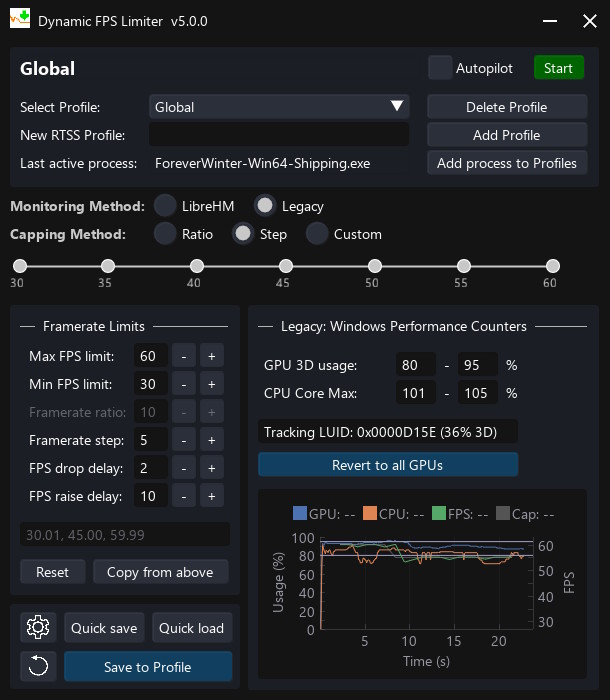
Honestly, it's a godsend. You can configure whatever thresholds you want, how often you want it to run and alter the limits (so it doesn't overcompensate either way), alongside support for all of the modern GPU vendors, even though you do have to use the "Legacy" option for Intel Arc GPUs.
This way, when the game is being demanding, it just makes the framerate pull back to 50 FPS when needed so the usage sits around whatever limits I configured, for example 80%. Here's a video timestamp that demonstrates it really well - if I increase the graphics settings further, or would have a more intense area in the game temporarily, the limits can then decrease to 40 FPS or another value, within the limits I set. It might be a bit counterintuitive, but this leads to a smoother recording and stream, because the media engine no longer gets overloaded.
The final results
I'm not just making all of this stuff up, I also had Fable dig through the OBS logs (e.g. the first screenshot with the dropped frame statistics) because I was trying to see whether the LLM can help me figure out any workarounds in the first place, and you can see the results of a few runs here:
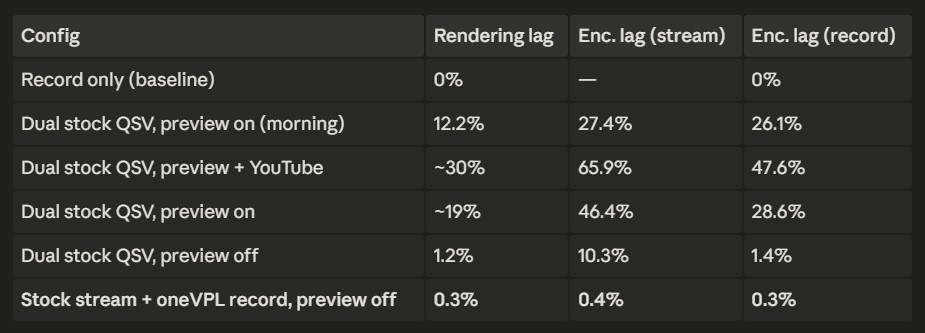
Here we see that QSV stream + oneVPL recording does pretty well once you get rid of the OBS previews, but personally, I discovered that at least for games like The Forever Winter, the Dynamic FPS Limiter and just stock QSV is good enough. You might lose a few frames here and there, but you don't have to count on a deprecated plugin that you have to compile yourself (and that might not be 100% compatible with future OBS versions, at least the main QSV one is in tree).
So, here are my final recommendations:
- consider closing the preview in OBS to get a bit more spare capacity
- consider closing any YouTube or similar videos playing in the background, same as above
- install RTSS and Dynamic FPS Limiter, configure the latter to keep the GPU load around 80-85% at max
That turned out simpler than expected, but in a way is also giving up - I don't think we can fix how the Arc GPU media chips work in software. We might just have to either give other vendors money or wait for them to release better GPUs, but there's no way in hell I'm able to afford an Intel Arc Pro B70 and they themselves are not going to be releasing the B770 A.K.A. "Big Battlemage" and might not even have a consumer Celestial segment.
What a mess, they're missing out on a lot of good business, even competing with 9060 XT 16 GB and 5060 Ti 16 GB would be pretty good and dunking on the 8 GB variants more so, nobody would even have a reason to buy those then, given that at least the B-series Arc GPUs were the only affordable ones for me.