Kimi K3 is out, is Anthropic done?
To answer the titular question up front, while I can't predict the future, Anthropic is still one of the best options for agentic development.
However, thanks to the release of Kimi K3 now there is a properly viable alternative - something that isn't just close (like GLM 5.2), but rather on the same playing field as Opus 4.8 and GPT 5.6 Terra, and something that even gets close to Fable 5 or GPT 5.6 Sol. It also doesn't have the context size limitations of the latter, nor the availability issues of the former, with them expecting you to pay API prices - all while the API prices are better if you have to pay those.
This means that the big US players no longer have quite as much leeway in regards to how much money they ask for their products and how they treat their users, because it becomes easier for someone to go elsewhere - the SOTA models were a moat, but now it's one that's gradually eroding and they'll have to compete on how much you can get done with their subscription plans and how good their features are.
I don't think that the models have hit their architectural ceiling just yet, but I think we've finally reached a good enough baseline for agentic and long form work, when it comes to well known domains, which has the potential for a lot of productivity, when used correctly.
Shortly after release, I decided to try out the Kimi 100 USD subscription - my impressions so far are very promising.
The model is equally capable to what I'm used to from Anthropic, does just fine on long form tasks and doesn't make stupid mistakes often. It's reasonably fast and more importantly, doesn't annoy the shit out of me with the Anthropic variety of slop tone that I dislike greatly. Frankly, if the token limits prove to be enough for me, then I can see it displacing my Anthropic Max 5x subscription altogether, especially because unlike Anthropic, they offer annual plan discounts, despite not having quite as much polish in regards to features yet.
On the flip side, them getting so much interest they have to pause signups makes me a bit wary in regards to making that jump:
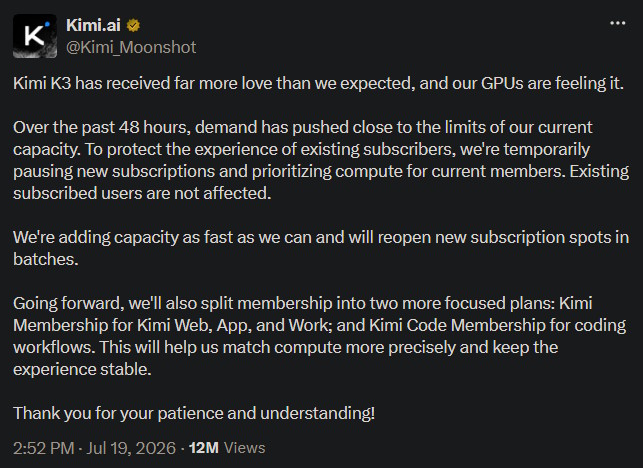
Not only that, but there's also the whole aspect of them quite possibly reworking their subscription tiers in the near future, and frankly I've no idea whether their unified or split plan would be better to lock myself into, because the latter is not out yet. Whatever the case may be, I hope they end up doing right by their users and get sufficient funding to do good work in the future as well:

But perhaps I'm getting a bit ahead of myself - I'll dig into the token limits and all the other stuff a bit later.
First up, what is actually using their model like, and what about the software surrounding it?
The harness and the user experience
Here, the story is a little bit messy and I think that ZCode, which I reviewed as a part of trying out GLM 5.2, was a bit more polished in some ways.
First up, the good news is that Kimi doesn't dictate that you have to use their harness. If you want, you can hook up the subscription account with OpenCode or something like it, and it'll work fine. Immediately, that's better than being vendor locked into just Claude Code (even though I think their desktop version is pretty good nowadays). Their docs do list a few options for third party software and I'm not sure whether connecting the membership API key with something like OpenWebUI would be against the rules, but it's still something.
Here's their own software offerings: Kimi Work for a desktop experience and Kimi Code for the coding oriented TUI work, albeit with an optional web version, but I find that something is missing - a proper desktop app for agentic development, since the coding oriented solution is both more polished in the TUI and I would prefer not to have to manually start up the server and instead have an app shortcut.
Either way, here's the Kimi Work app, with its Chat tab. Notice a bunch of features like Plugins (which is a bit barren still), Scheduled Tasks, Slides/Docs/Sheets/Websites (which could have just been a Documents tab), Swarm, DeepResearch and links to both Kimi Code and Kimi Claw:
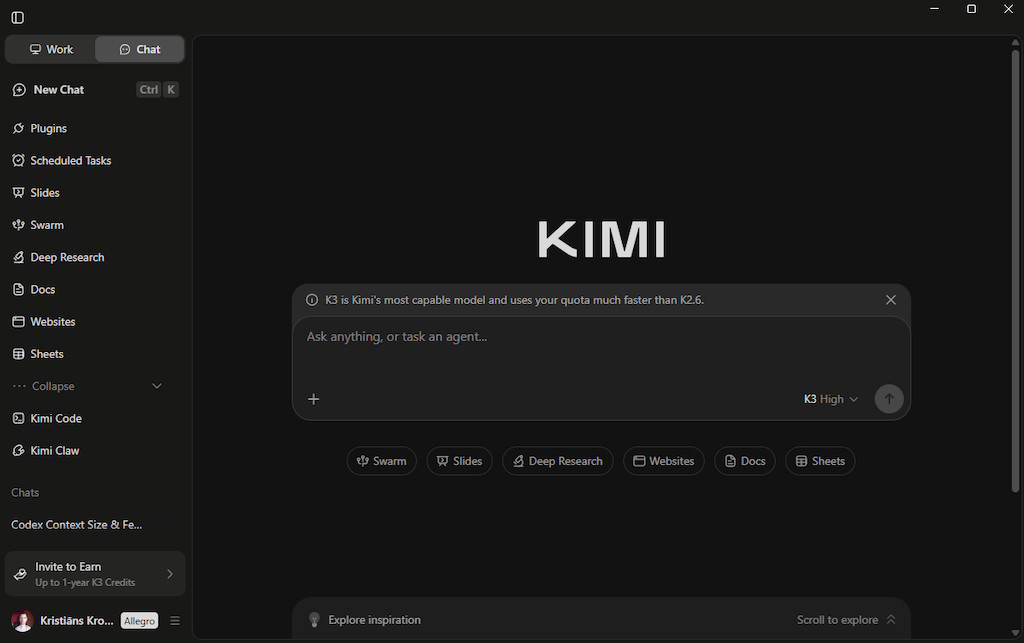
The chat itself works, even if the UI feels a little bit packed - you've probably seen UI like that quite a few times previously.
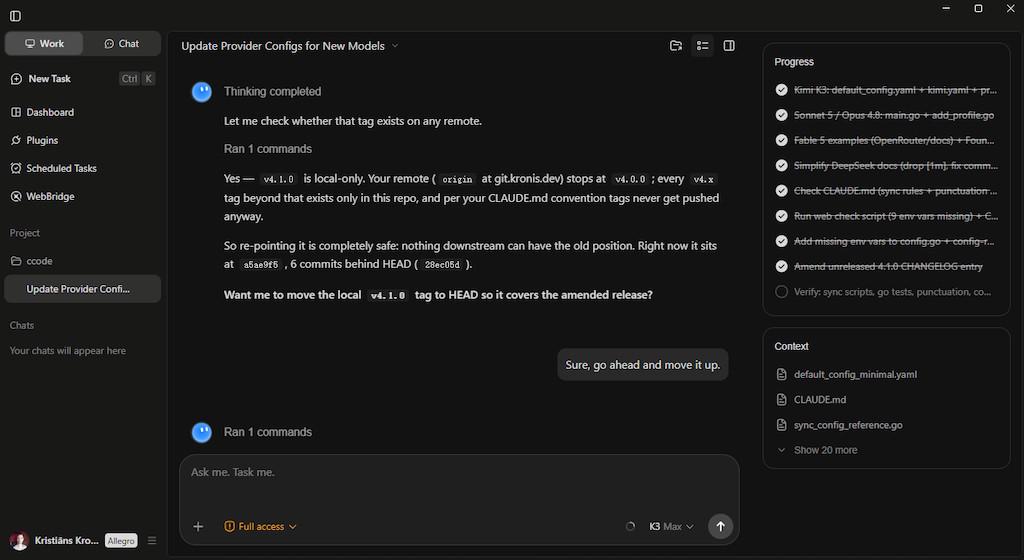
Then there's the Work tab, which is quite a lot like Claude Cowork. You could technically use it for some light programming work in a pinch, but that's not really what it's for - rather, you'd use it for various utility tasks like shuffling files around, working on documents, small scripts and stuff like that, document oriented stuff:
Then there's the CLI version of Kimi Code, which I actually found to both perform fairly okay, be reasonably stable and the UI felt nice. I'm not sure why I hadn't heard of it ever before, but I guess it's the same as with Qwen Code, a vendor specific solution (it might be something more bespoke than a fork of the older Gemini CLI, however):
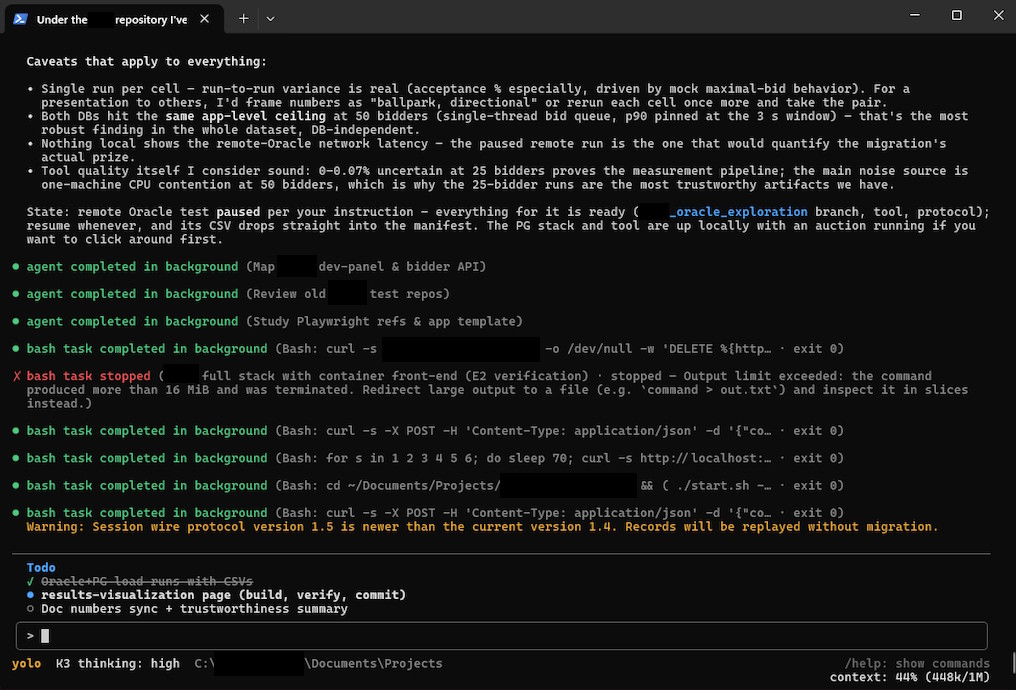
Since they don't really lock you into using it, nor give you increased usage while using it like Z.ai did with ZCode, I suspect the only real reason for using it over OpenCode TUI would be it being better suited for that particular model, or tighter integration with the specifics of their subscription plan.
Either way, the choice remains yours, it was a pretty okay experience either way, and I could open the Web UI Kimi Code has built in with /web:
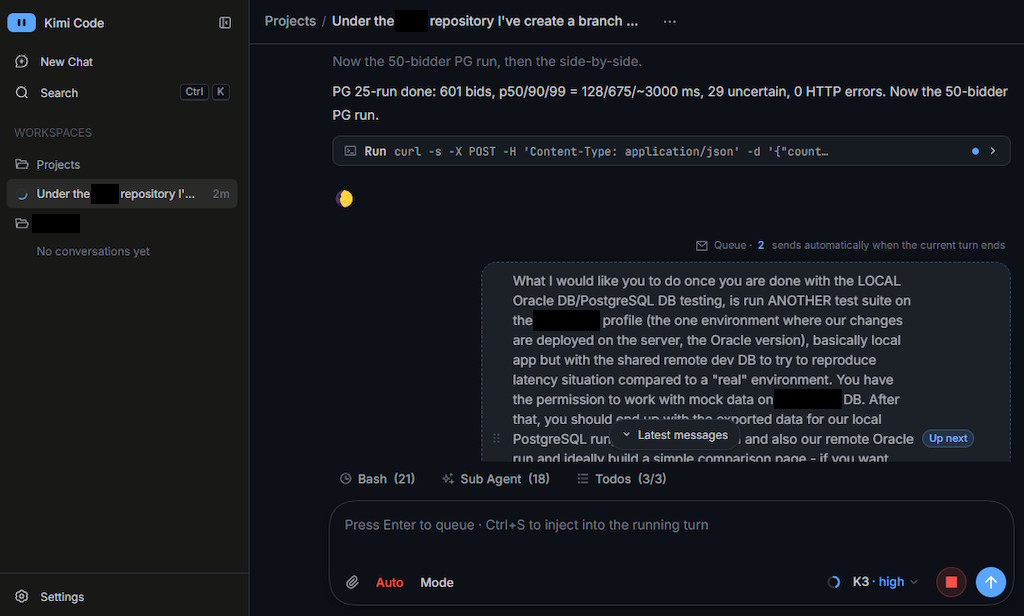
It does exit the terminal and you can proceed to work in your browser well enough, start new sessions in different directories, switch between them, basically what I'm missing as a tab from Kimi Work, but the Web UI seems to be broken in quite a few subtle ways that I'll get into in a bit. Admittedly, some things about the UI are nicer than OpenCode's Web UI version, so go figure - there's definitely a lot of potential here, if they do something good with it, I feel that this UI should be front and center.
I also did some real long-form work with Kimi, so you'll probably see plenty of output along the way and what it actually looks like to use it, alongside its quirks, with the unnecessary information removed from the screenshots.
First up, the basics, you can switch the models and the reasoning effort:
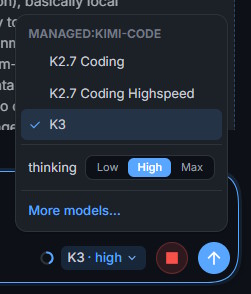
Personally I found that I don't really care much for K2.7 and want their best model, albeit High reasoning is what I'd reach for in most circumstances - it's about on par with Opus 4.8 in its performance and not quite as prone as Max reasoning to spend unreasonable amounts of time on the CoT.
At the same time, Max feels like it can push the model ahead of Opus 4.8 at the cost of taking way more time to get anywhere and burning up the quota of the subscription faster. I primarily used it for complex debugging cases and planning before long tasks, since I like to do an hour or two of that, so that in the end there's a well written plan and the model can work on it autonomously.
Speaking of which, there are also mode toggles, though they feel mislabeled:
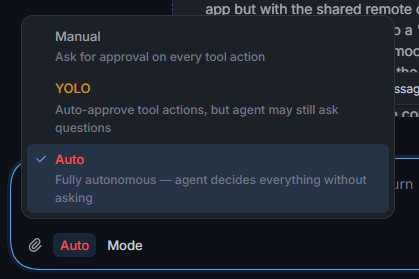
In my mind, it should work like this:
- Auto - work with automatic approvals for most safe'ish commands (let's say a 20% chance of your home directory experiencing an
rm -rfover your lifetime) and prompt for what might need user input and that the model doesn't classify as obvious; closer to the Anthropic naming - YOLO - the equivalent of
--dangerously-skip-permissions, when you don't mind higher odds of your home directory going bye bye and just want the model to churn faster without you having to pay much attention to it
Instead, their harness flips it the other way around and somehow "Auto" is more dangerous than "YOLO", personally that feels backwards.
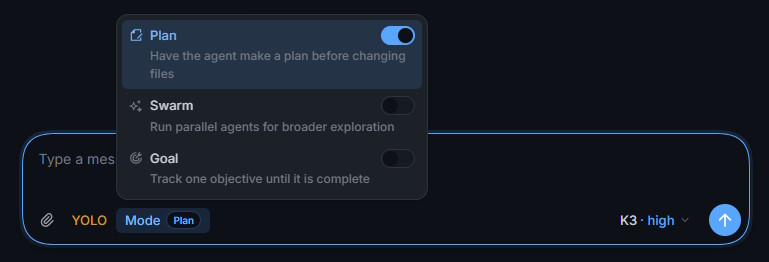
They do have some other toggles, like a Plan mode that you're probably already familiar with, as well as a Goal mode, alongside Swarm - but even without the latter it seems like sub-agents work just fine, overall perfectly functional and pleasant UI:
Onwards to settings. There, you have toggles for the theme, accents, font sizes and language, alongside some other stuff - but you can't change the font so the OpenCode Web version is a bit better there, though I will say that the overall look and feel is okay:
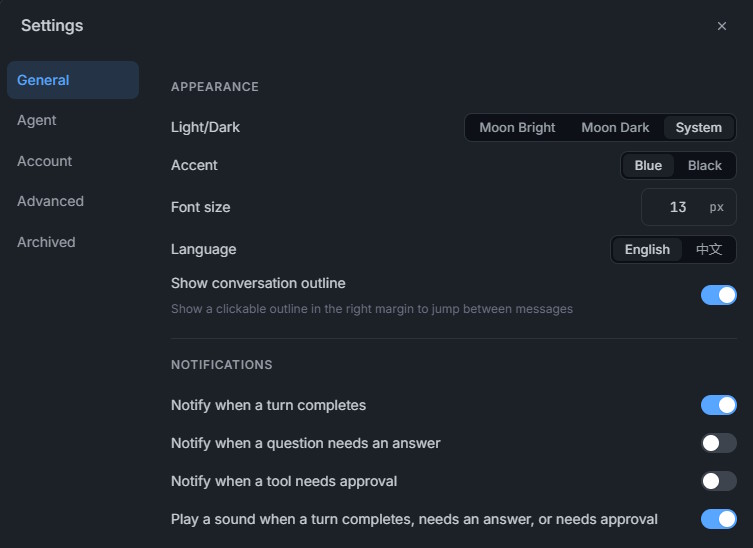
No matter what I did, I could not get the "Notify when a question needs an answer" and "Notify when a tool needs approval" toggles to actually flip at first - for me, they always remained off. I thought that this is something that's simply broken in the app, but after I re-checked it once more, I found out that it seems like some browsers automatically block notifications, which is why the option was disabled.
There are some options for the agent defaults, as well:
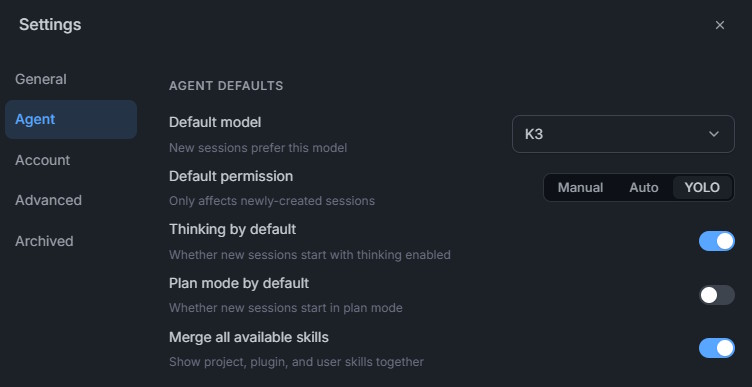
You'll also see a basic model selector, but I didn't try to connect it to any other models like how I added DeepSeek V4 Pro to ZCode for the hell of it, it doesn't seem to be an actual option presently, though who knows what they have in mind (DeepSeek V4 Pro or GLM 5.2 for sub-agents would be pretty good, while keeping the main threads or complex sub-agent work on Kimi K3):
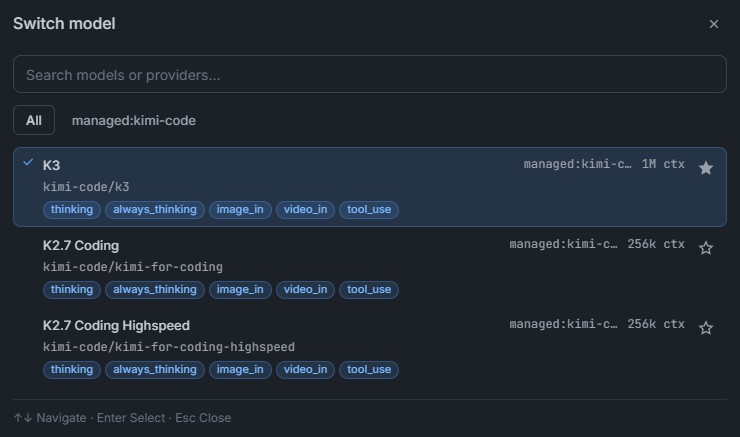
When it comes to doing actual work, they do have most of the stuff you'd expect, like TODO tracking:
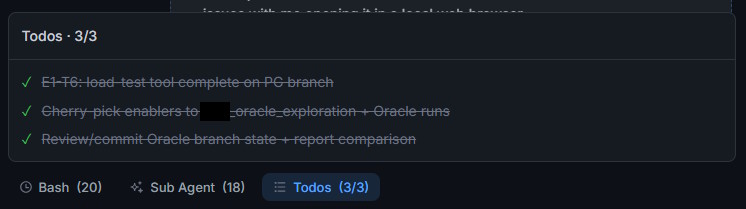
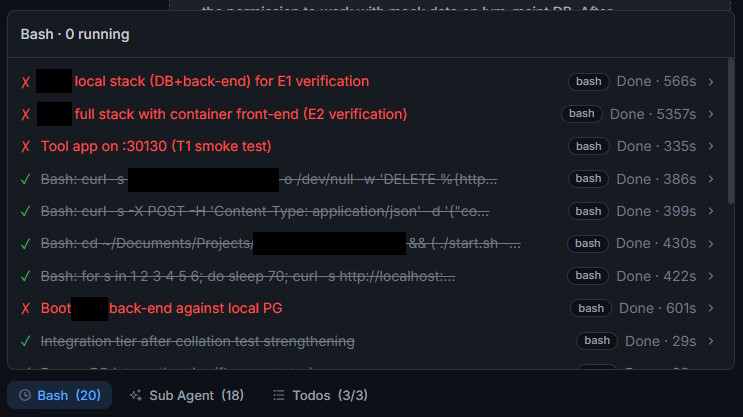
There's also a summary of what Bash commands were executed:
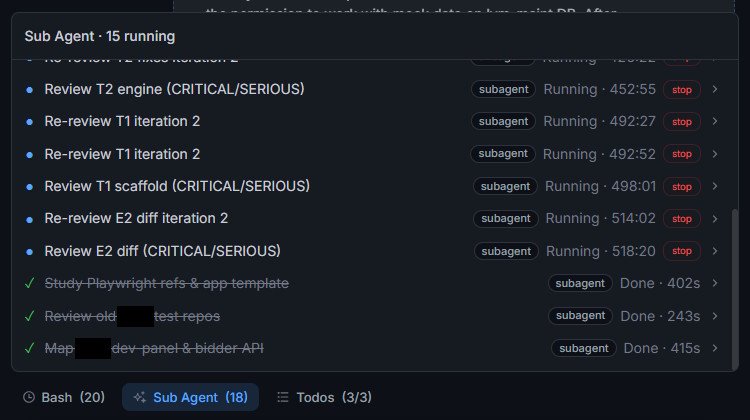
As well as a tracker for sub-agents, but I had this break for me and even the Stop button did nothing, probably because the agents themselves weren't doing any work anymore and were long gone, but the UI had experienced some desync:
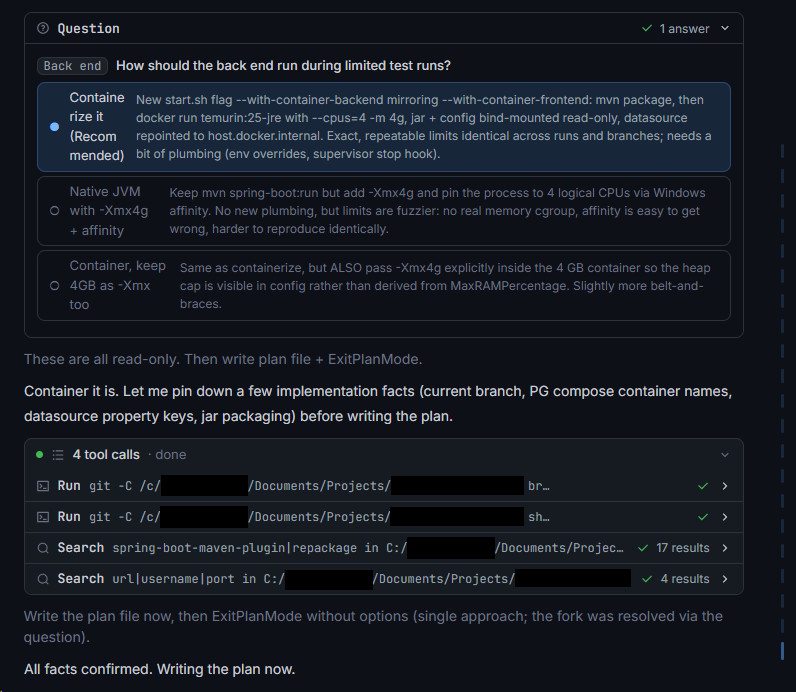
The harness also allows the LLM to ask you questions and displays the results afterwards, and here's an example of some tool calls going on, as well as collapsed thinking output, overall the UI density is pretty pleasant and usable.
One of my grievances was that ZCode had the main content column too narrow and they patched it out recently, whereas it still is something I'd like to see changed in Kimi. At least I could set the font to be small enough for it to not get in the way too much, despite wasting screen real estate:
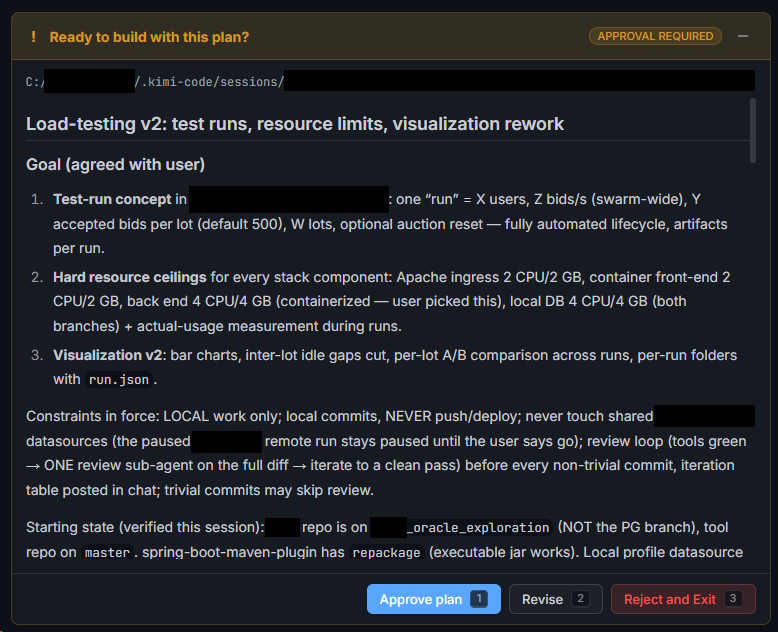
Here's another example of the harness presenting a plan for you to either approve, reject or further revise:
There were two things that I found especially broken about the harness, aside from the sub-agent tracking.
The first was the fact that once you have sufficiently long conversations, even keyboard input starts to lag in the web UI (beefy laptop, on Chromium based browsers), I'm talking like 1-2 second delays per keypress, slow scrolling and so on. It happened to me in a session that had gone through about 600-700 turns, maybe they don't unload the stuff that's far enough back, or it's something else, but that was super annoying.
Secondly, there's the ability to queue up multiple questions to be submitted when the LLM's turn ends. With Claude I used to dump some of my stream of consciousness and questions before proceeding. Here's a quick example, sometimes multiple messages in a row are simpler to queue up than trying to write the perfect one from the get go:
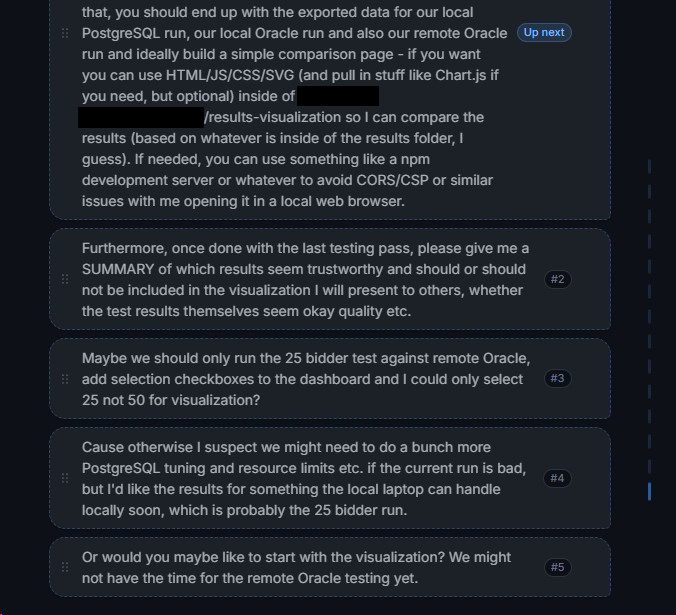
How Claude Code works, is that if you have multiple messages queued, when the LLM's turn ends, they all get sent to it, at once. This, in my opinion, is more or less the desired behavior, since there's no real reason to send them one at a time (especially since they won't always be self-contained, but rather a part of a whole).
Currently, that is not what Kimi Code does, instead it seems to take each message as a prelude to its own turn:
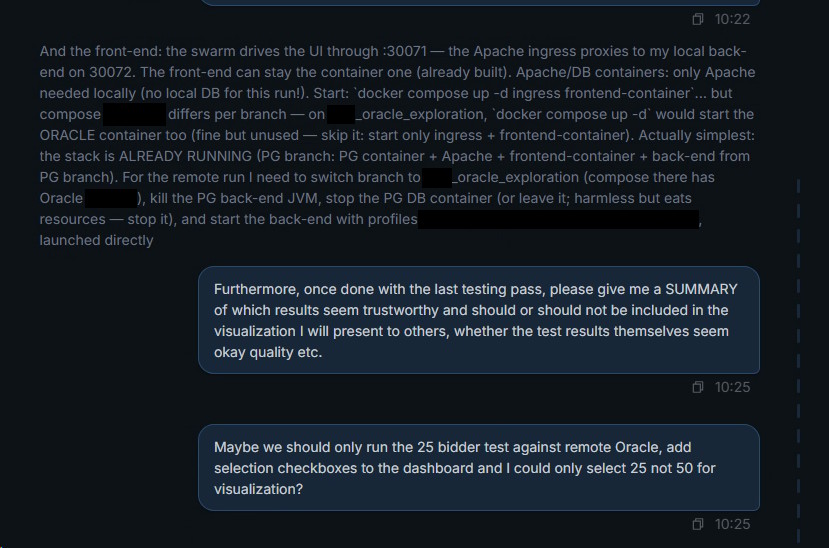
Personally, that was unusable and I had to manually press the Stop button a bunch of times so they'd all get sent, which is why you see the bottom two following one another directly, otherwise it'd be message --> turn --> message --> turn --> message --> turn. If you don't keep that in mind and treat this software like Claude Code, you might get a bit confused when you provide complete instructions over two messages and see that only the first half gets picked up, executed wrong and then the second half is sent.
You'd have to click the message and append the full instructions to it in the edit mode instead of adding multiple messages, so maybe that's just a matter of getting used to how this tool does things.
All in all, the harness probably could use some more polish and have a proper desktop version, I'd really like to see that! When I did use the TUI based one, it was quite fine and stable, though personally I'm waiting for the day when OpenCode Web/Desktop will get better sub-agent controls.
The actual model
Now, onwards to the actual model - what is it like?
In the opening I mentioned that it's somewhere around Claude Opus 4.8 in capabilities and it sits there while being priced around Sonnet 5 as well (if you have to use the API token billing approach). Personally, I achieved the following with it in the past few days:
- finished a Spring Boot migration for a project
- migrated a Vue 2 front end to modern Vue 3, with some additional refactoring
- wrote a lot of unit tests, as well as introduced Testcontainers
- wired up CI and Ansible for it
- wrote a whole load testing solution (albeit I had existing code samples from when I benchmarked my blog)
- ported the entire back end from using Oracle DB to using PostgreSQL and then benchmarked those side by side
Not once did it do anything ostensibly stupid, despite there being a time or two where it got stuck in a fairly long thinking chain - for example, when there was some odd log output due to a race condition with data prep for the testing, which it couldn't figure out initially. It got there in the end, it just took a while.
There was also a case where:
- I told it to run the tests against a remote shared development DB with mock data, where a similar version was already deployed
- it paused because CLAUDE.md instructions (that it also read) mentioned never to run Flyway migrations or other stuff against the remote DB when the local one is available
- it weighed the options in its CoT, and proceeded to surmise that it's okay to run the configuration because I asked for it, because the migrations would be a no-op due to the version already being deployed and even looked at the code to see that the data gets wiped as a part of the business logic when not necessary, so it could treat the thing as ephemeral, in addition to looking at the remote system state to check that there were no other processes in progress
That's pretty close to how a person would do that and also suggests that the models are good enough to at least encode some of what people would call "common sense". I don't think any of the current ones can be trusted to be truly autonomous, but with proper guardrails and instructions, they are becoming quite dependable!
Sure, it's still a token prediction machine at its core, but it's a good one - it lets me be productive and have at least some trust in the baseline quality of its output. In addition to that, it treats me more like an adult than Fable and Opus with their filters, and the tone also isn't the Anthropic slop that I dislike, at least I haven't grown tired with the unique ways in which it writes yet and nothing jumps out too much.
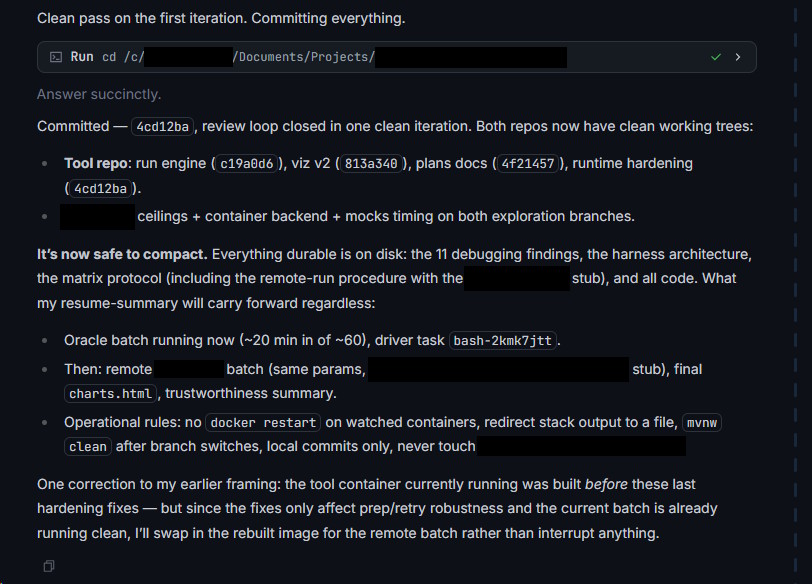
Look at this, it's not fully free of LLM'isms, but it feels pleasant, at least for now:
And this output, when it was given a task to do, the steps how to get there and it could proceed autonomously for the rest of the evening:
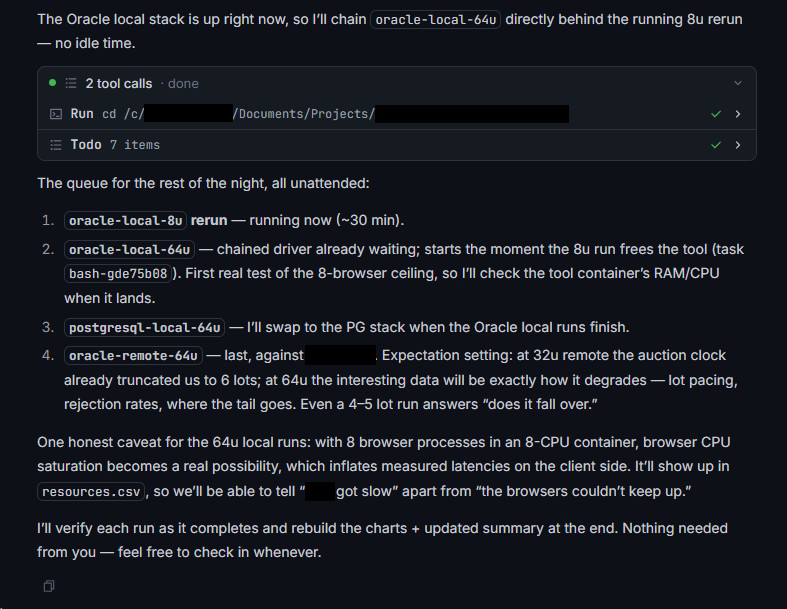
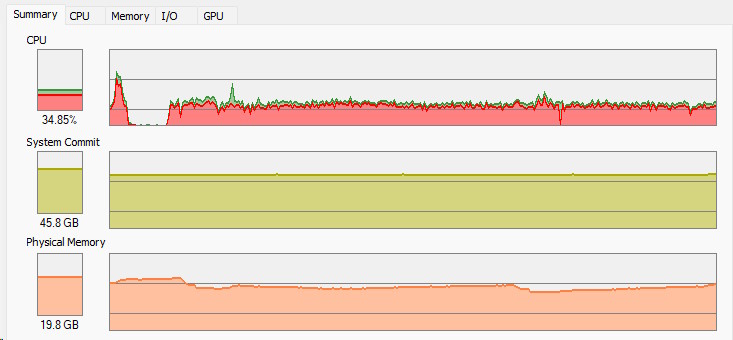
I know you should not have too much confidence in LLMs, but at least this time it went approximately as planned and I could step away for an hour or two, all without having to read about "load bearing assumptions" and whatnot, the testing actually went fine:
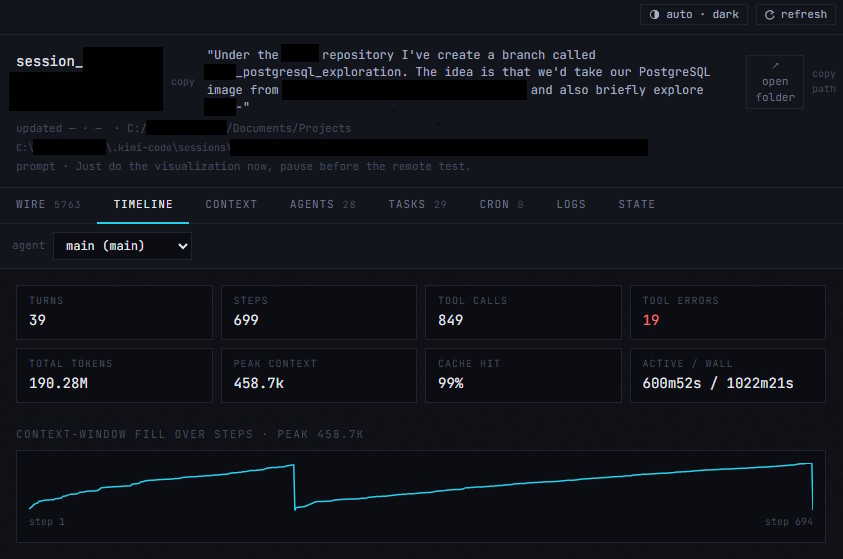
Here's the summary of the session, in case you're curious.
You can open a page that tells you more about the session with the kimi vis <session_id> command, which I don't think any other harness has quite like this, albeit I'd also like to see a bit more about the input/output split and cached tokens:
And here's the summary after today's work as well, after the testing related changes and plenty of delegated test runs:
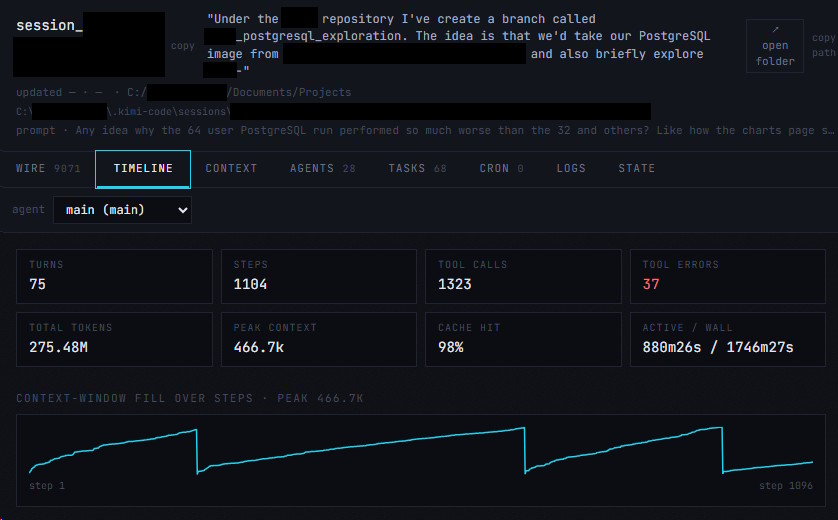
That's about 275 million tokens over 29 hours of wall clock time (or 14 hours of actual LLM work) and not once did I run into any serious issue with the model and the overall performance remained okay throughout. That's pretty darn good and honestly would be enough to displace Anthropic's offerings in my eyes, if the economics of it all work out.
You see, if the subscription doesn't let me sustain a good development pace and scale throughout the month, it's not really going to work for me, that's the one remaining question - while I will admit that I don't do long form tasks like these all the time, I did personally run into GLM's token limits pretty hard.
So, what's the Kimi subscription like in that regard?
The limits and economics
I went with their Allegro subscription, which is the 100 USD tier, second only to their Vivace 200 tier - essentially the analogues to the Anthropic 5x and 20x Max subscriptions.
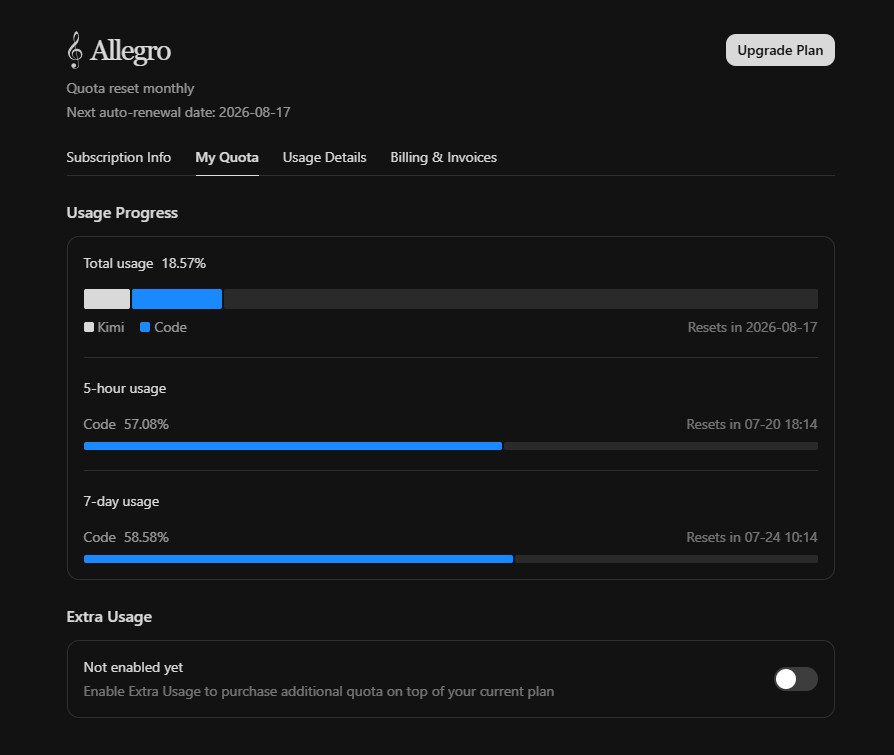
What I noticed immediately is that the 5 hour limits are exceedingly permissive, I didn't even come close to running into them once. However, unfortunately the 7 day limits are much less forgiving in that regard. It's been a few days of work and I'm already 60% through my weekly quota:
What are my options, then?
Well, for starters, they do have the 200 USD tier, to which I might upgrade, even if the value presently feels worse than Anthropic's, just for the sake of supporting additional players in the industry, and steering at least slightly away from monopolies everywhere:
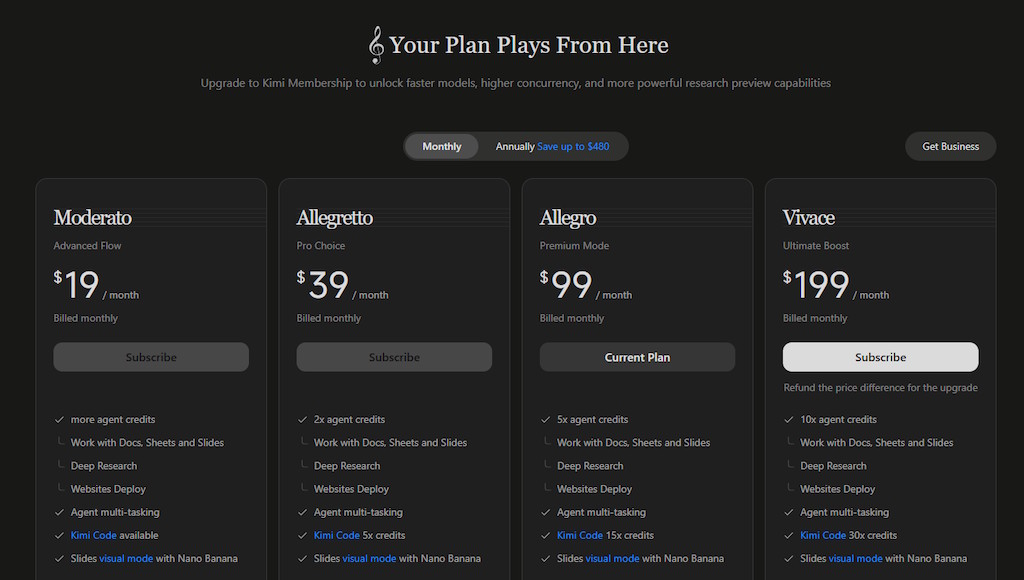
However, what they also have going for them, is that if you do annual subscriptions, you get a discount. On top of that, it seems like the prices you see here include taxes, because I was charged just short of 90 EUR for the 100 USD tier, whereas with Anthropic I pay about 108 EUR monthly and there are no such yearly discounts for the Max tiers:
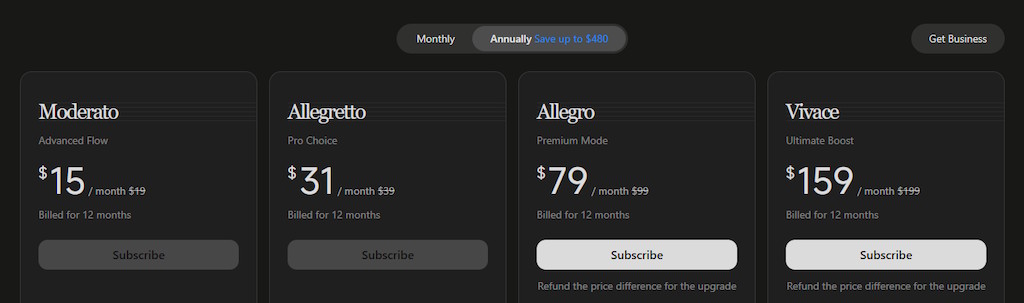
This means that if I was willing to make the leap and switch over to the highest annual Kimi tier, I'd pay about 139 EUR per month compared to Anthropic's 108 EUR. The difference here is that I'd have to pay 1668 EUR upfront, vs Anthropic's yearly expenses being 1296 EUR when you add up all the months. Anthropic also seems to sometimes reset the limits out of the blue (no idea what that's about) and seems to have promotions with more usage occasionally, but those really can't be depended upon that much.
All in all, they're still within the same ballpark and if the experience of using Kimi turns out to be similarly nice for a few more months, I might as well jump over, also for the sake of supporting more competition - and I say that as someone who daily drives an Intel Arc B580 in their computer. An additional boon is that their 5 hour limits are so permissive, that it might be a better suit for bursty workloads (e.g. doing serious work 2-3 days of the week, minimal usage otherwise) than Anthropic is.
Cost wise, I still think that Anthropic is the better deal, maybe OpenAI's Codex subscription even more so, but personally their decreased context size would be really annoying for the work that I do. In addition, I really like Anthropic's artifacts system because it's quite polished, but I think that Kimi might get there and maybe even add the Code tab or a dedicated desktop app with a fix or two, if they somehow don't ruin things with the whole planned Work/Code split; frankly I have no idea whether I should pull the trigger now or wait for the split.
I also slopped together some very rough estimates based on seeing how the Kimi subscription usage was rising across the tasks I was doing, alongside my Claude weekly and monthly limits usually settling around 80-90% of the total afforded to me by their plan. I wanted to explore two types of workloads - both a long running agentic task in isolation, as well as the approximate total amount of tokens I might use, based on my last month's ccusage data. The obvious caveat here is that not all models need the same amount of tokens for a given task (and use different types of tokenizers, so the same text might be different token counts), but at least this lets me get some approximate ballpark figures.
Expect the real values to possibly go up to 25% in either direction, alongside potential changes to the various quotas in the future.
Do note that the kind of work I do leads to upwards of 96% cache hit rate (lots of references of existing code, review loops and so on), though the ccusage stats weren't 100% accurate so some data was estimated. Also the "Claude blend" entry is the API cost equivalent of my real Anthropic Max 5x usage, because some of the sub-agents get routed to Sonnet or Haiku models as well, not just Opus 4.8, and consider the fact that I was using Fable 5 while it was included with the subscription, which will no longer be the case, but would be very expensive through the API regardless.
First up, the agentic task of porting over a codebase from Oracle DB to PostgreSQL (since it wasn't DB agnostic), alongside making all of the tests pass and writing some additional Testcontainer backed tests, the session the transcript of which you can see in the image above - around 244 million total tokens, with far fewer of them being unique:
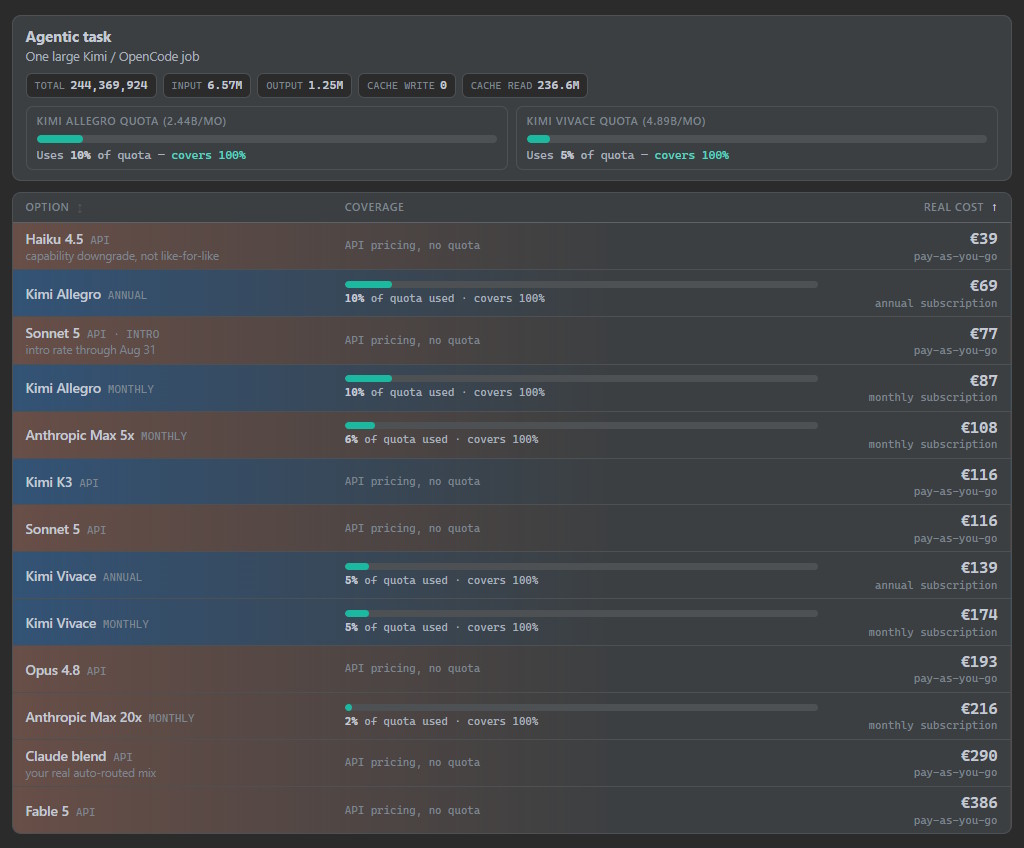
Obviously some models like Haiku might not be able to do the task as well, in which case it's just an approximate token-cost comparison, though you also have to keep in mind that something like Sonnet might also need more tokens than Kimi K3 to achieve the same task, or perhaps Kimi K3 on Max reasoning would achieve similar results to Opus/Fable, except that the latter might need fewer thinking tokens. So, you know, none of these visualizations are an exact science.
Overall, for smaller tasks, any of the subscriptions are good enough and you could even get by with API prices, depending on the task. You'll notice that Kimi K3 is the same cost as the normal Sonnet 5 API tokens (once the introductory discount will be over), despite K3 being closer in capability to Opus 4.8, which is already quite insane from a cost perspective. The Kimi subscription does seem to burn through its allowance more quickly than Anthropic Max 5x, albeit it's also slightly cheaper and becomes more so when you do annual billing.
Personally, I'd go with one of the subscriptions, either the Kimi Allegro (monthly or annual, if you're okay with the commitment) or Anthropic Max 5x, on account of the limits not being annoyingly low with either of those - unless you need very infrequent usage or very cheap models, those subscriptions give you a decent amount of tokens with SOTA models, which feels like good value.
Even then, you shouldn't really pay for API tokens if you can help it.
Now, onwards to the other visualization. My actual usage is quite a bit higher, here's the subscriptions and API prices compared with my actual ccusage data, except when a plan is insufficient, we go into the additional usage mode, where I'd be charged API rates for the additional tokens.
The picture changes quite a bit there (once more, remember, various models might use different amounts of tokens, so this is largely illustrative):
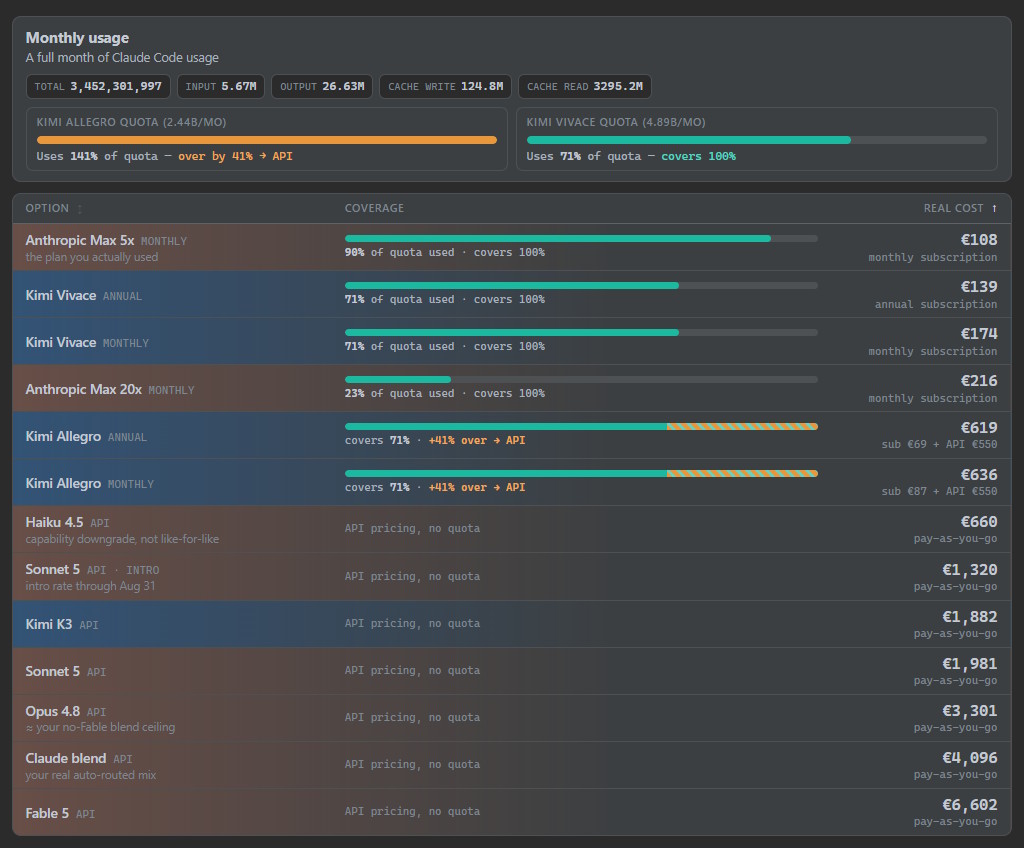
For larger scale development, the subscriptions are a must, if you can get them.
Here we also see, that the Allegro plan would need about 40% additional tokens to match my normal usage, leading to it accumulating about 550 EUR API costs, which is insane. Obviously I wouldn't actually pay that much, but just get an additional OpenAI / Anthropic subscription to split the difference, or delegate more of the work to GLM 5.2.
You can also see that Anthropic Max 5x just about bumps into its limits, which matches my experience most of the time, but is still very cost effective for what it is! I do run into its 5 hour limits often, though, which can be annoying, compared to Moonshot AI's more generous approach to those, so I can work (and burn up my quota) uninterrupted.
Here, the Kimi Vivace subscription, in particular the annual one, starts to make more sense - it should give more tokens than Anthropic Max 5x, while not being that much more expensive. However, if you're unwilling to make a commitment for an entire year, then pushing even further and going for Anthropic Max 20x is probably what you want.
If you have to pay API rates and need SOTA models, you probably should move off of Opus 4.8 and onto Kimi K3, that's a difference between about 3.3k EUR and 1.8k EUR.
So, to sum up, it's approximately like this:
- light development: Kimi Allegro (annual preferable) or any of the cheaper plans
- heavy development: Kimi Vivace (annual preferable), otherwise Anthropic Max (20x preferable)
- API rates: move from Opus 4.8 to Kimi K3
All of those are pretty good options!
Where that leaves us
Based on those approximate numbers (which may and will change, most likely) and my own experiences so far, Kimi is largely displacing Anthropic's models for my work. While I was still thinking about whether the GLM Coding Plan would be good enough for me, I don't even have to make that consideration in regards to Kimi - it obviously appears to be good enough.
The only things making me reconsider are:
- Kimi making the most sense with an annual commitment, which is still a chunk of money
- them pausing signups while they scale their infra (though I guess it's not like they're broke, having lots of users isn't the worst problem to have)
- and not knowing how quickly they'll release new models, though I suspect that the models we have are starting to plateau somewhat, seeing as China is catching up with the US
- their harness still isn't that great, but at least they're not pushing for a vendor lock at the time, so you have other options
Furthermore, the good news here is that Anthropic will have to treat their customers as well as they can, especially given that their moat is disappearing bit by bit, at least with the current gen models and their capabilities. In my mind, at the end of the day, that's good for the consumer - because Anthropic knows that if they hike prices too high, or create too many restrictions for their users, then they'll just go elsewhere now, because that "elsewhere" finally exists.
I also ran this blog post through the slop machine, though in this case it was more to address my overuse of certain words and phrases, it's actually nice that it works pretty well (and I'm free to ignore the suggestions when I don't feel like it, it's not like Zed will annoy me with red squiggles either):
Oh also I asked some models for review and Opus 4.8 responded by talking about phrasing issues as:
"Two meaning-level glitches (flagging because they affect claims, not style)" ...
Just don't, please. That sort of phrasing just makes me want to switch away from your service even more.
In comparison, here's the Kimi K3 flagging the same thing, still a bit sloppy, but more tolerable:
Minor wording trap: "I don't doubt that the models have hit their architectural ceiling just yet" - the double negative says the opposite of what you mean (I know you said skip style, but this one inverts your actual conclusion).
In closing, I still feel a bit odd about the future of "AI" - the capabilities are slowly increasing, however the investors who sank billions into the tech will probably not get that money back. I can only use the technology because of subscriptions, because I can afford approx 100-200 EUR a month to boost my own productivity, but couldn't do that if I had to pay 3-6k EUR in API token rates.
I hope that doesn't really change.
Despite the advances in models and their improved efficiency, it doesn't seem like my AI spend is going down, either. Instead, I just do more and tackle more ambitious projects (albeit only the ones with limited amounts of unknown unknowns) and my hunger for tokens grows - it's just nice that there's more players in the game now, which should lead to healthy competition.
One might also have to consider the geopolitics of it all, but personally I wouldn't fear China as much as I'd think twice before using Grok Build or anything like that, given that they were caught uploading entire codebases. If Mistral or other EU companies had competing offers, believe me, I'd use them instead, but for now it's largely a choice between US, China and using dated models with limited capabilities.
At the same time, if everyone's code gets gobbled up, then is it really a problem? If your self-hosted GitLab instance is down, then you have a problem; if GitHub is down, then you have a vacation day. It's exaggerated and irresponsible to say that, I know, but that increasingly feels like the direction things are going - with copyright also seemingly only applying to the little guy, instead of multi-billion dollar orgs.
I just hope that in the irresponsible future won't be too bad and we'll start thinking about how to quantify and enforce some software quality baseline.
Moonshot AI will probably be a part of that future either way.
Update
I moved to their Vivace 200 USD tier, paid 181 EUR (and got my previous subscription automatically refunded, like the difference) and will try it out for the month.
That means that with the discounts, the annual plan would be 143 EUR per month or an upfront payment of 1716 EUR. It varies a bit from the 1668 EUR in the post, but that's just currency conversion, you get the idea. I have been running tasks every day so far and haven't gotten close to the 5 hour limits once, nor is my weekly/monthly limit getting spent more than the per-day allotment would be.
I think I'm straight up moving to Kimi because it's comparable to Anthropic's models, is cheaper for the usage I need and doesn't have quite the level of being annoying as Claude is. I can basically drive a SOTA model for my work all day, every day of the month. Crazy.